Approving and deploying
A wave is run, not deployed step by step. Start wave takes every artifact in it through translate → deploy → validate; what comes out the other side is a set of validation results and a gate waiting for a human. This page covers that run, what the validations prove, how the gate works, and what cut-over means.
Goal
You finish this page with a wave whose artifacts are on the target, whose validations are green (or whose failures you understand), and whose gate is approved.
Prerequisites
- A wave with artifacts in it. See Creating a migration wave.
- Write access to the target dataset for the datasource Forge uses.
Steps
1. Start the wave
Execution tab → Start wave. Forge runs the artifacts in parallel under a bounded semaphore, in dependency order:
- Tables by direct copy — create the table on the target with the mapped schema (types,
NOT NULL, column defaults), then copy the rows. - Tables by Lakeflow — for anything over the size thresholds, Forge runs the generated Lakeflow pipeline and waits for it.
- Translatable artifacts — translate if there is no translation yet (an existing or hand-edited one is reused), deploy with bounded self-heal on failure, then confirm the object is queryable.
Each artifact moves Planned → In progress → Migrated / Needs review / Failed. When the last one finishes, the wave goes to Validating and the validations are dispatched; if anything failed, the wave is Failed and you can Re-run wave after fixing — only the artifacts that are not done run again, so migrated tables are not copied twice.
An artifact retranslated or edited after the wave ran returns to Planned (see Reviewing translations); starting the wave again picks it up, and the wave goes back through its gate.
2. Read the validations
The Validations tab lists every rule for the wave with pass / fail / not-yet-run, and lets you Run any of them again; validations are idempotent. If any rule fails, the wave is Failed — fix the cause (the data, or the translation: see Reviewing translations) and Re-run wave, which re-runs only what is not done and then the pending and failed rules. Three families:
Data reconciliation (tables)
Created automatically for each migrated table from the reconciliation policy (resolved table → wave → project → default):
| Check | What it confirms |
|---|---|
| Row count | Source and target have the same number of rows (within an optional tolerance). |
| Numeric aggregate | The sum of each numeric column matches — catches rounding or truncation a row count would miss. |
| Row hash (cross-dialect) | Both sides hold exactly the same rows, compared with engine-independent fingerprints, so a Teradata row still matches its migrated copy despite different decimal/date formatting. Opt-in (it reads rows). |
| Null rate | Flags columns whose share of NULLs drifts between source and target — catches values silently dropped by a bad mapping, including in text columns. |
The default enables row count and numeric aggregate. You can also hand-author one-off rules from Create validation rule, including a business rule — a SQL assertion that passes when it returns no rows.
Code parity (views and routines)
function_parity runs a migrated view, table function or UDF on both engines and compares a fingerprint learned from the target: row count, the sum of every numeric column, distinct counts of the others, non-null counts. Nothing is configured per object, and a target object that cannot be queried fails rather than passing by absence.
- Views get the rule automatically.
- Table functions and UDFs need parity probes — sample calls on each side — set in the artifact dialog. Without probes no rule is created and the artifact dialog says not validated by function_parity; it is never counted as passed.
- Procedures return nothing to fingerprint, so
procedure_parityruns the migrated procedure on the target and compares the tables it writes with the source, before and after the call. It needs a parity call on the artifact — exactly oneCALL/EXECstatement, plus theDECLAREan OUT argument needs — set in the artifact dialog by a system admin (it runs on the target with the credentials validations use); the written tables are read from the translation. No call, no rule: a load is never run by default. The source procedure is never run. That is also the proof for a set-based rewrite.
Why this exists: the table checks never see code. On a real estate, three views and functions deployed clean, read Migrated, passed every table check — and were wrong.
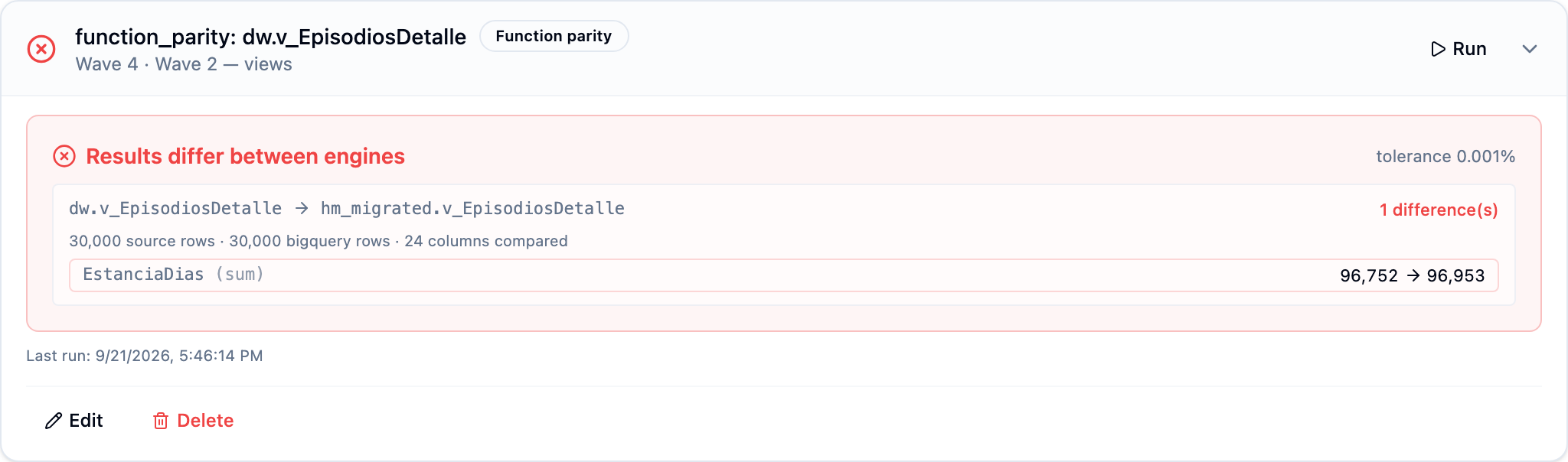
The one above is a genuine difference, not a translation bug: the view exposes days-open for episodes without a discharge, computed against today — the source was last calculated three days before the target. A parity check that cannot tell you this is not worth running.
Structural
Deploy already confirmed each object is queryable; the dependency order came from the wave plan. There is no separate "parse" or "sandbox" pass.
3. Clear the gate
When every validation has passed, the wave moves to Awaiting approval and its gate opens on the Approvals tab. A gate has required_approvers — specific users, groups, or both; a member of a listed group approves on its behalf. Click Approve (or Reject with a reason). Approval carries the actor into the audit trail; the same happens from chat ("approve the wave 2 gate").
A red validation never reaches the gate: the wave is Failed until the rule passes. What the gate asks a human to sign is everything the checks cannot see — the artifacts in Needs review, the skipped ones, the business meaning of a tolerance.
4. Parallel run and cut-over
Deployed artifacts live on the target while the source keeps operating. The Parallel run tab captures reconciliation during that coexistence, so you watch drift converge to zero instead of hoping.
The Cut-over tab is the project's readiness check: artifacts still outstanding (Needs review, Failed, unplanned inventory), failing validations, pending gates. Begin cut-over with blockers requires force and is recorded as such; Complete is go-live and marks the project complete; Abort resumes migration. A rollback plan is generated from what was deployed.
Redirecting downstream consumers (BI tools, jobs) to the target is yours to do — Forge records the milestone, it does not repoint your dashboards.
What happens if the run fails
A table fails — almost always permissions or quota on the target, or a type the mapping refused. Fix, then Re-run wave: only the unfinished artifacts run.
A translatable artifact fails — self-heal already retried with the deploy error as context. The artifact is Failed with the full error in its drawer; Fix with AI, edit by hand, or skip. See Reviewing translations.
The wave sits in Validating — the validation dispatch was lost (Celery or Redis hiccup). From chat, "run all validations on wave N" dispatches them again and the wave moves on; the runner also has a recovery path that catches this on the next pass.
Metrics, dashboards, alerts
Every wave produces metrics under the qry_forge_* prefix — exposed to Prometheus, displayed in the qry-forge Grafana dashboard, and integrated into the qry.forge alert group. Useful ones to watch:
qry_forge_wave_duration_seconds— how long runs are taking.qry_forge_translation_self_heal_attempts— translations needing more than one self-heal pass; a rising trend means the LLM is struggling with your dialect's quirks.qry_forge_deploy_failures_total— fail counter; alerts page on > 0.
Common issues
Start wave is disabled. The wave is Running, Validating or Awaiting approval. An Approved wave can be started again only when it has pending work (an artifact back in Planned or Failed); otherwise use Re-run wave, which asks for confirmation.
A routine shows no validation at all. It has no parity probes (or, for a procedure, no parity call). Add them in the artifact dialog and run the wave's validations again; without them a routine is never reported as passed.
A procedure_parity result says "equal · unchanged by the call". Expected when the tables were copied after the source procedure had run: the migrated procedure is idempotent and left them as they were, which is exactly what equivalence looks like on that data. To see it move, clear what it computes (or point the copy at an earlier state) and run the validation again; the result then says "changed by the call" with the rows before and after.
Validations passed but the procedure is slow on the target. Faithful translations keep row-by-row logic. Look for row-by-row preserved on the artifact and read Reviewing translations.
Emergency: a run is producing wrong results.
The FORGE_GLOBAL_KILL_SWITCH environment variable disables Forge tenant-wide while you investigate (endpoints answer 404 so clients stop rather than retry). The feature flag runtime_config.forge_translation.enabled is the gentler alternative — it stops translation only.
See also
- Creating a migration wave — pre-requisite walkthrough.
- Reviewing translations — what to do with Needs review and Failed.
- Exporting to dbt — the deliverable once the views are verified.
- Forge reference — full feature reference, including all metrics, alerts, and the Migration Guide / Runbook links.