Core concepts
A short glossary so the rest of the guide makes sense. The navigation rail (≡) groups everything QRY exposes:
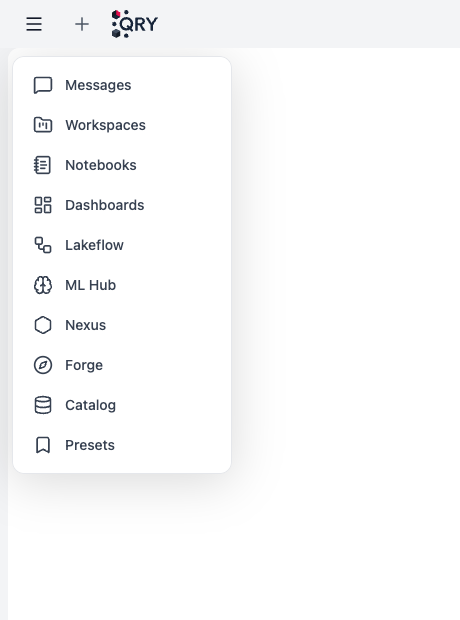
Each item below maps to one of those entries — or to a concept that lives across them.
Datasource
A connection to a database — Postgres, BigQuery, Snowflake, SAP HANA, Starburst, Databricks, Oracle, SQL Server, Redshift, Cloudera, Salesforce, and more.
You don't see datasources directly in the menu; you reach them through the Catalog, which lets you navigate datasource → catalog → schema → table. Access is controlled at every level by RBAC, and within a table by ABAC tag policies.
Conversation
A chat session bound to one schema of one datasource. Conversations have memory across turns, support checkpoints and rewind, can be cancelled mid-stream, and can be shared as public links.
You start a conversation by browsing to a schema in the Catalog and clicking Open in Chat — see Starting a conversation.
Workspace
A team-scoped collaboration space with shared conversations, uploaded files, and AI memory. One workspace = one auto-managed RAG context: any file added to the workspace is indexed and becomes searchable from chat by every member.
Workspace membership does not grant access to underlying datasources — RBAC is checked separately at query time. See Creating a workspace.
Notebook
A Jupyter-like sequence of cells (SQL, Python, Markdown) for repeatable analysis. Each cell can pick its own model — cheap for routine SQL, strong for the final synthesis. The whole notebook is bound to one datasource.
Notebooks can be scheduled with date variables ({{today}}, {{this_month_start}}, …) that resolve fresh on every run, so a notebook written for "yesterday" stays correct over time.
Dashboard
A page of tiles — charts, KPIs, tables, Markdown — with optional global filters that affect every tile. Tiles run their own SQL queries against datasources you have access to.
Dashboards can be hand-built or AI-generated from a natural-language description, and made public via a share token. See Creating a dashboard.
Data product
A curated, governed, published asset managed in QRY Nexus. A data product wraps a table, view, or query, hides or masks sensitive columns, optionally applies row filters, and tracks quality through scheduled checks.
Internal users discover data products in the Nexus explorer; external systems consume them via the API Gateway with qry_* keys, sliding-window rate limits, and a full audit log. See Publishing a data product.
ML model
A model trained, registered, and versioned in ML Hub — XGBoost, LightGBM, Random Forest, Linear / Logistic regression. You start a training run from chat, monitor it in ML Hub, and promote from Staging to Production when ready. See Training a model.
Lakeflow pipeline / job
Declarative data pipelines (YAML DSL) and DAG jobs (orchestrating pipelines, AI prompts, Python, notifications) that live under Lakeflow. Pipelines run with draft → deployed → deprecated lifecycle and define expectations that catch bad data before it spreads. Out of scope for the user guide — see the Lakeflow reference.
Forge migration
A wave-based migration platform for moving Teradata / Oracle workloads to BigQuery — under the Forge menu item. Tables migrate either by direct copy or via Lakeflow (automatic when >10 GB / >10 M rows); views, procedures, UDFs, and macros are auto-translated by an LLM with bounded self-heal on deploy failures. See the Forge reference and the dedicated user guide section.
Memory
Per-user or per-workspace persistent memory the AI can read, update, and recall. One PostgreSQL backend; the AI uses it across providers (Claude native, Gemini and OpenAI custom tools). See Memory and personalization.
See also
- Features overview — the deep-reference twin of this glossary.
- Quick start — your first answered query in 5 minutes.