Reviewing translations
Forge translates views, stored procedures, UDFs, table functions and macros from the source dialect (Teradata, Oracle, SQL Server) to the target's. Running a wave translates and deploys them in one go, so review is not a gate the wave waits at — it is what you do with the artifacts the wave could not close on its own, and with any translation you want to read before trusting.
This page covers where those artifacts show up, what each state asks of you, and how a corrected version reaches the target.
Goal
You finish this page with no artifact in Needs review or Failed in your wave that you have not decided on, and with every hand-made change deployed rather than sitting in the editor.
Prerequisites
- A wave that has run at least once (see Approving and deploying), or one you translated ahead of time with Retranslate (see Creating a migration wave).
- Familiarity with the source dialect's quirks — translations are usually right, but you are the judge.
Where an artifact ends up
After the wave runs, each translatable artifact is in one of these states on the Execution tab:
| State | What happened | What it asks of you |
|---|---|---|
| Migrated | Translated, deployed, and confirmed queryable on the target | Nothing. Validations take it from here. |
| Needs review | Deployed, but held for a decision (see below) | Decide: accept, rewrite, or skip |
| Failed | The deploy failed and the self-heal budget ran out | Repair, edit by hand, or skip |
| Planned with Target runs the previous translation | You retranslated or edited an artifact that was already deployed | Redeploy, or the target keeps running the old code |
| Skipped | Someone decided not to migrate it | Nothing — it stays listed as outstanding debt |
A wave counts an artifact as done when it is Migrated, Validated or Skipped. Needs review and Failed do not count, and both block cut-over until resolved.

Why an artifact is held in Needs review
Three reasons, and the drawer tells you which:
- Low confidence — the translator's own confidence is below the tenant threshold (default 70 %).
- A warning that asks for manual review — for example a
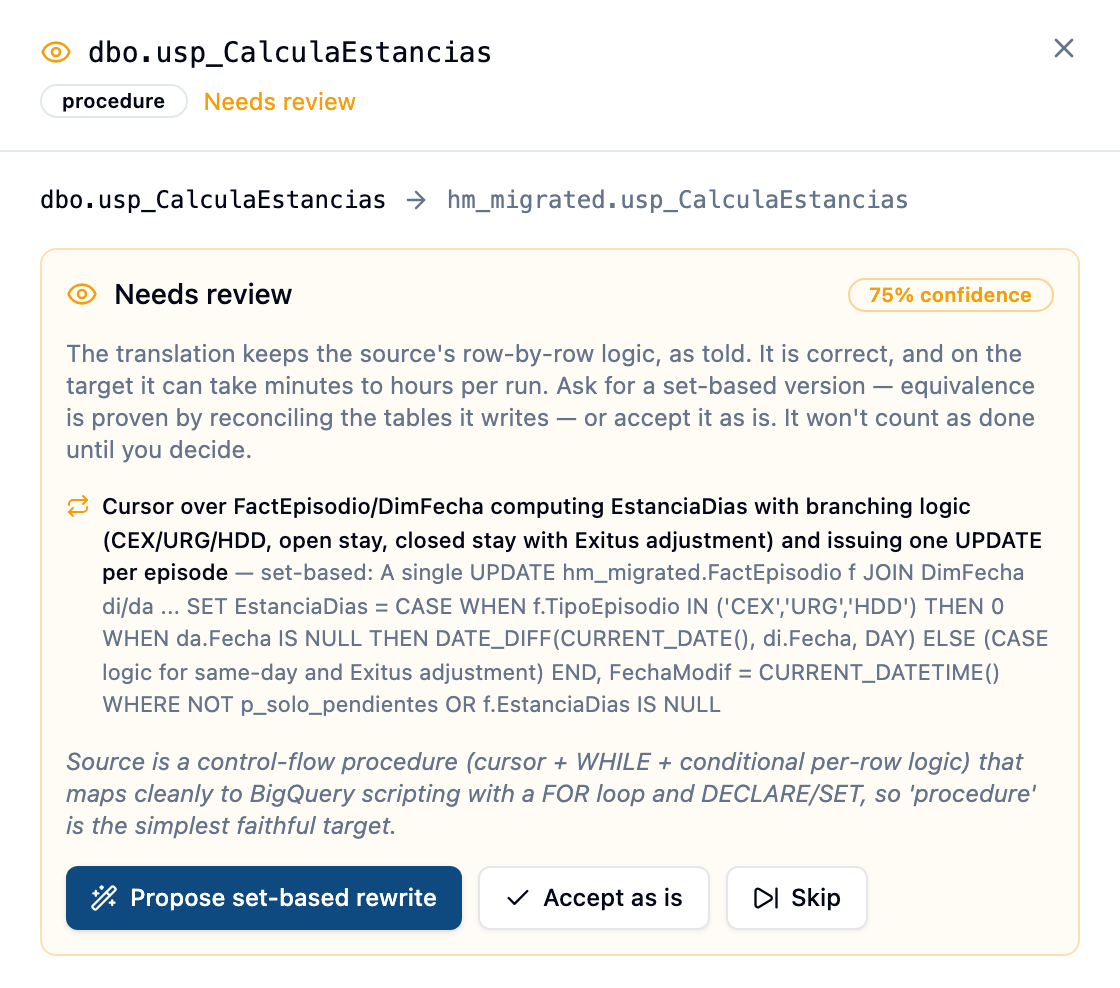
GRANTthat was stubbed out. - A preserved row-by-row loop — the source did per-row work (a cursor issuing one
UPDATEper row, aWHILEthat inserts one date at a time) and the translator kept it exactly, as it is told to. The row says row-by-row preserved. The translation is correct; on a warehouse it may take hours per run, which is why it is not quietly marked Migrated.
The hold is a decision, not a doubt about the deploy — the object is on the target.
Steps
1. Open the wave and pick an artifact
Execution tab → click the wave → click any row. The drawer shows the source → target mapping, timings, and the panel for the artifact's state.
2. For Needs review: decide
The panel lists the translator's warnings (or, for a preserved loop, the loop and what a set-based statement would do instead) and offers:
- Accept as is (or Accept — reviewed) — a human has read it and the translation stands. The artifact becomes Migrated. The decision and who made it are in the audit trail.
- Propose set-based rewrite — only for a preserved loop. Opens the translation page and asks the model for a version in which only the row-by-row control flow is replaced by set-based statements: same signature, same calls, same counters, same business rules. See step 4.
- Skip — this object will not be migrated. It stays listed so it is not forgotten.
3. For Failed: repair, edit, or skip
The drawer shows the full deploy error. Fix with AI runs one more repair with the error as context and, if you accept it, redeploys. If you would rather fix it yourself, open the translation page (step 4), edit, and Redeploy. Or Skip.
4. The translation page
From the drawer, or from the Artifacts tab, open the artifact's translation. Two panes: the source (read-only) and the translation, editable. Above them:
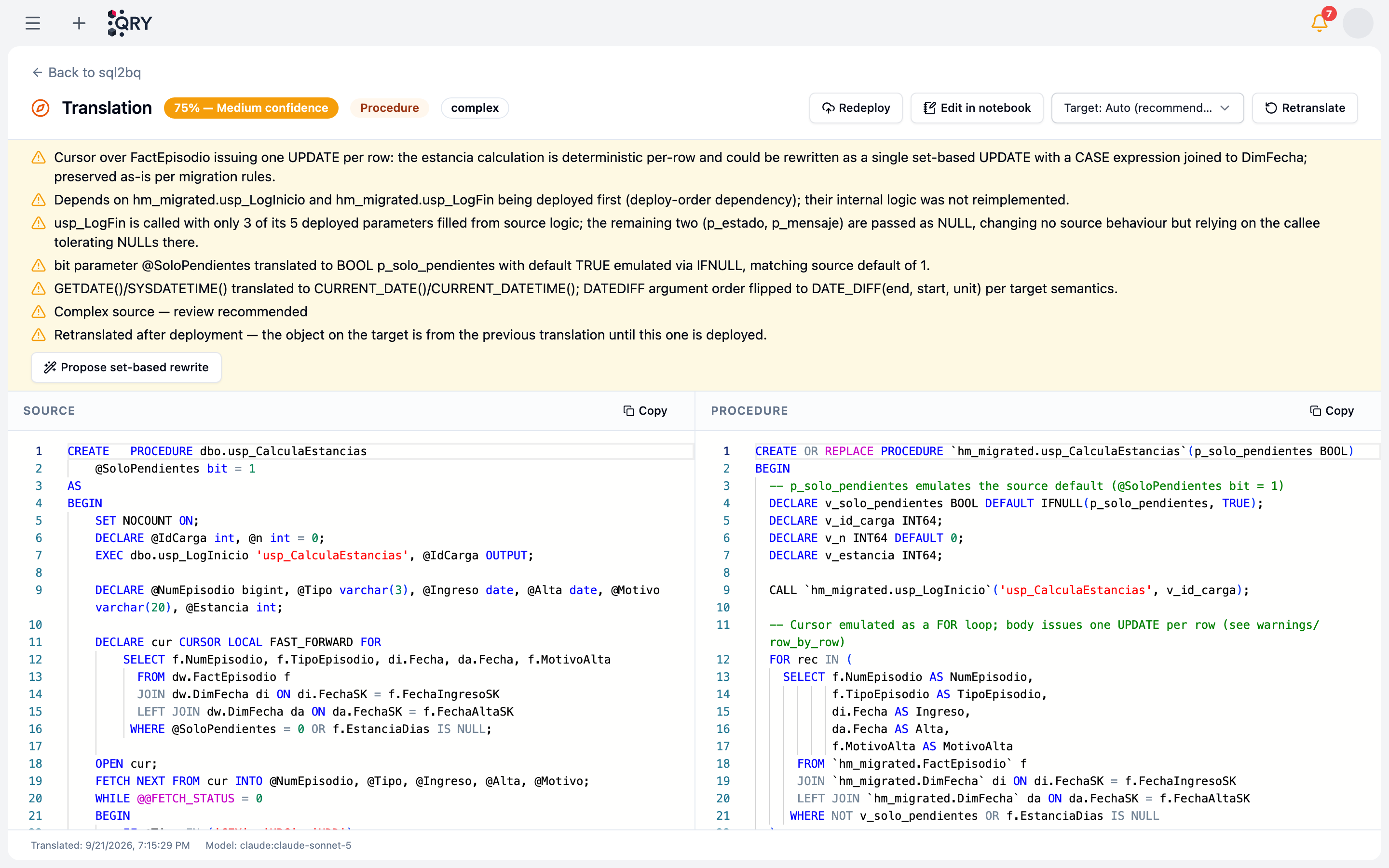
- Warnings — everything the translator wanted you to know: what it remapped (
DATEPART(weekday)underSET DATEFIRST 1,DATENAMEand locale,bitflags emitted asBOOL), which callee it kept as a call rather than re-implementing, which loop it preserved. Read these before the code. - Retranslate — run the translator again with the current prompt. Useful after a prompt or rule change, or when you suspect it had bad context. If the artifact was deployed, it returns to Planned with Target runs the previous translation.
- Deploy / Redeploy — create or replace the object on the target from what is in the editor. Deploy copies no data and checks no dependencies; it does confirm the object is queryable, because some targets accept at
CREATEwhat they refuse at query time. - Edit in notebook — hand the translation to a QRY notebook bound to the target when you want to run pieces of it interactively.
- Propose set-based rewrite — shown when the translation carries a set-based advisory. The proposal appears above the editor with its confidence, rationale and, first, what changes in behaviour — read that list before the code. An empty list asserts exact equivalence; a non-empty one names the honest differences (a date function evaluated once per statement rather than per iteration, no intermediate state visible mid-run). Apply to editor saves it as a manual edit; Discard drops it. Nothing is applied until you say so.
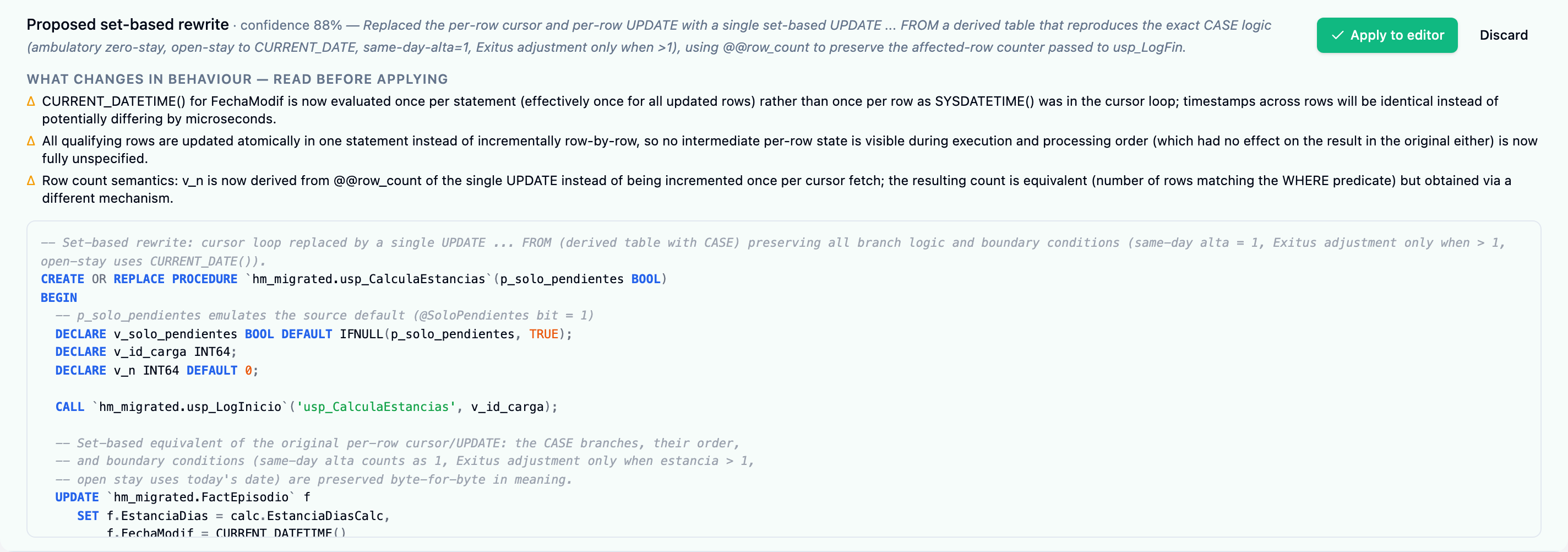
Edits are saved as manually edited and are never overwritten by a wave run or a wave-level Retranslate — your version is what deploys.
5. Redeploy and prove it
After an edit or an applied proposal the artifact is Planned again: click Redeploy. Then let the evidence decide, not the reading:
- Views, table functions, UDFs — the
function_parityvalidation runs the object on both engines and compares a fingerprint learned from the target. Views get it automatically; a table function or UDF needs parity probes (sample calls on each side) in the artifact dialog, otherwise it stays visibly unvalidated. See Approving and deploying. - Procedures — have an admin give the artifact a parity call (exactly one
CALL/EXECfor the target, in the artifact dialog) and theprocedure_parityvalidation runs it on the target and compares the tables it writes with the source, before and after. This is the proof for a set-based rewrite: the table checks do not care how the rows got there. See Approving and deploying.
6. Repeat until nothing is waiting on you
The wave's counts on the Execution tab show what is still Needs review or Failed. The Cut-over tab lists the same as blockers.
Parity probes for routines
A view can be compared by selecting from it. A table function or UDF needs arguments, and invented ones would prove nothing — so Forge asks you for them. In the artifact dialog (Artifacts tab → the routine), Parity probes takes one call per line as source => target:
dbo.tvf_EpisodiosPeriodo('2025-01-01', 'HNOR') => migrated.tvf_EpisodiosPeriodo('2025-01-01', 'HNOR')
(SELECT dbo.fn_Edad(FechaNac) AS v FROM dw.DimPaciente) => (SELECT migrated.fn_Edad(FechaNac) AS v FROM migrated.DimPaciente)
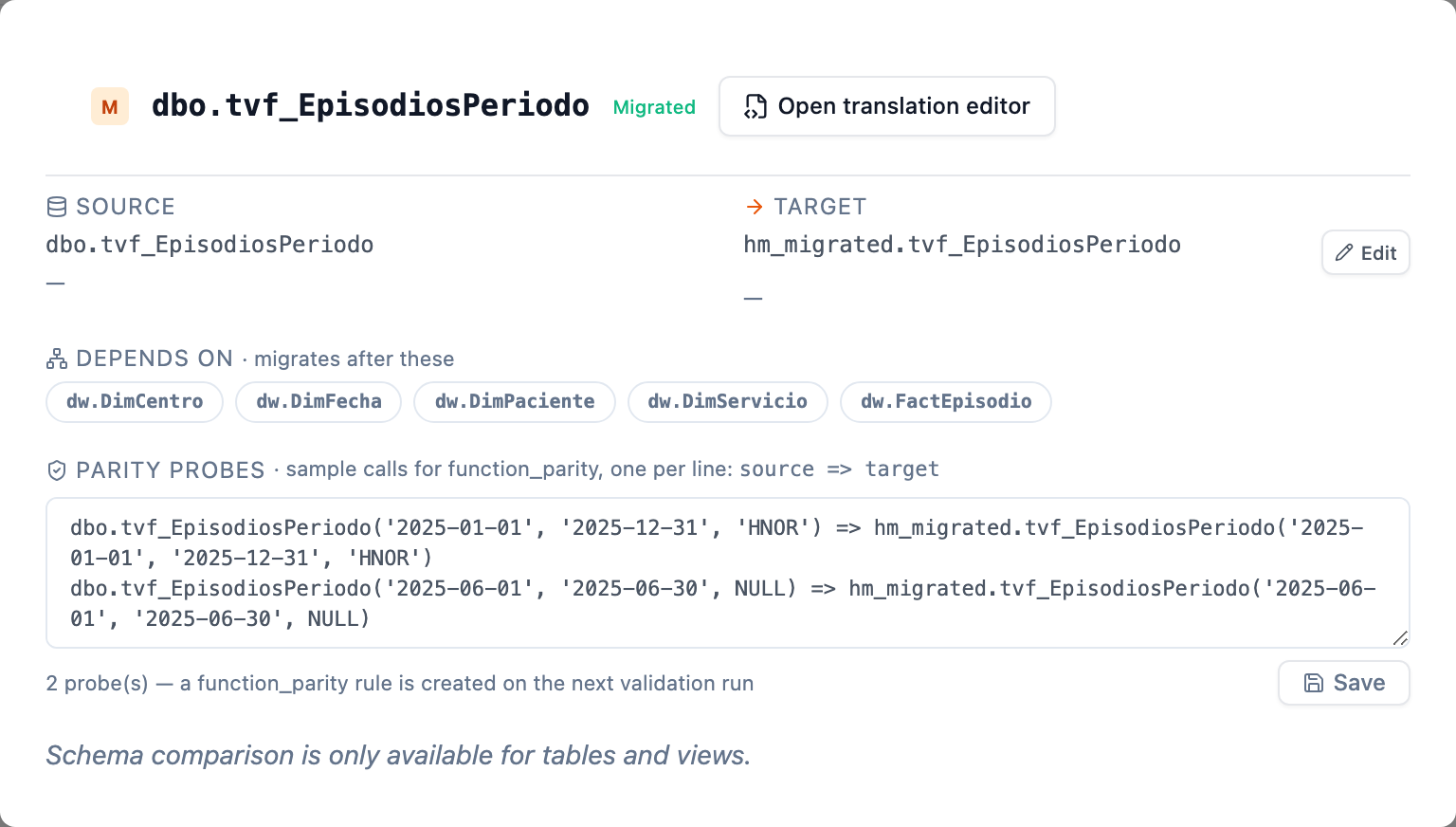
Pick arguments that exercise the routine on real data (a period with rows, a centre that exists). With probes set, the wave's next validation run creates the rule; without them the dialog says not validated by function_parity and no rule exists — never a pass.
A procedure takes a parity call instead — the one statement procedure_parity will run on the target:
DECLARE n INT64; CALL `migrated.usp_CargaDimFecha`(NULL, NULL, n);
Exactly one CALL/EXEC, plus the DECLARE/SET an OUT argument needs, is accepted, and only a system admin can set it: it runs on the target, unattended, with the credentials a wave's validations use. Pick arguments that make the procedure do its full work (a full load rather than "pending only"), because what is compared afterwards is the tables it wrote.
Common issues
The artifact says Migrated but the view returns an error when queried. Retranslate and redeploy. Deploy already checks that a view is queryable, so this should not recur; if it does, the error text in the drawer is the thing to send us.
I edited a translation and the target still runs the old code. An edit does not deploy. Look for the Target runs the previous translation badge and click Redeploy.
The proposal changed something it should not have. The proposal must list every behavioural difference; if the code does more than the list says, Discard it. Ask again with a hint in the request (the API accepts one), or write the statement yourself in the editor — your edit is what deploys, and the reconciliation of the written tables is the proof either way.
A translation re-implemented a function the source calls.
Report it; it should not happen. The translator is told never to re-implement a callee it does not have the body of, because a plausible CASE in its place is an invented business rule that deploys and returns wrong answers silently. Retranslate, and check the callee is in an earlier wave.
Wave-level Retranslate skipped an artifact. It skips artifacts in progress and hand-edited translations on purpose. Retranslate the artifact itself from its translation page if you want the edit replaced.
See also
- Creating a migration wave — pre-requisite walkthrough.
- Approving and deploying — running the wave, validations, gates and cut-over.
- Exporting to dbt — packaging verified translations as a dbt project.
- Forge reference — artifact states, what Deploy means, and the translation engine.