Building silver and gold layers
This guide builds a medallion — bronze → silver → gold — with a Lakeflow job whose tasks are plain SQL that runs inside your engine. Qry orchestrates (order, parameters, schedule, retries, run history); the engine does the work, so no row ever travels through Qry. It is written for people who already know SQL and their warehouse; the examples use Databricks and Unity Catalog, and the same shape works on BigQuery, Snowflake or PostgreSQL with each engine's SQL.
Goal
You finish with one job that:
- rebuilds a silver dimension in full (
CREATE OR REPLACE TABLE … AS), - loads a silver fact incrementally, one day per run, with a
MERGEthat is safe to re-run, - stops the chain when a quality rule fails, so gold is never built on bad silver,
- builds a gold aggregate from silver,
- runs every night on a schedule, and can back-fill any past day on demand.
Prerequisites
- A Qry admin account. SQL tasks write to your warehouse with Qry's own connection, so both the job's owner and the identity it runs as must be Qry admins — see Who can run SQL tasks.
- A datasource for the warehouse in Qry whose service principal or token can read bronze and create tables in the silver and gold schemas. Tasks name it by its name, as in Admin → Datasources —
databricks-prodin this guide; Qry keeps its id underneath, so the job survives the datasource being recreated. - The target schemas, created beforehand: this guide writes to
lakehouse.silverandlakehouse.gold. Replace them with your own. - Bronze here is
samples.tpch, which every Databricks workspace has, so you can run the guide as it is before pointing it at your own data.
Pipelines or SQL tasks?
Lakeflow has two ways to move data, and for a medallion inside one warehouse the choice is not close:
| Lakeflow pipeline | Job SQL task | |
|---|---|---|
| Where rows go | Read into Qry, transformed there, written back | Never leave the engine |
Measured (Databricks 2X-Small, samples.tpch) | 97,141 rows in 396 s — 245 rows/s | 37.5 M rows of silver in 25 s for the whole medallion |
| Unity Catalog lineage | None on its output (it writes with INSERT … VALUES) | Full: gold → silver → bronze, within minutes |
| Use it for | Moving data between engines | Transforming data within one engine |
So: silver and gold are SQL tasks; a pipeline is for when source and target are different systems.
1. Create the job
Open Lakeflow, choose + → New job in the explorer, and the editor opens on its YAML tab. Start from this skeleton; the panel beside the editor validates it as you type, lists the tasks with their line, and the Graph tab draws them.
apiVersion: qry.dev/v1
kind: Job
metadata:
  name: medallion-tpch
  description: Bronze samples.tpch → silver → gold, inside Databricks
spec:
  settings:
    fail_fast: true          # a failed task stops the run
    concurrency: 4           # tasks with no dependency between them run in parallel
    execution_identity: owner
    max_duration_minutes: 180
  triggers: []               # added in step 6
  tasks: []                  # added in steps 2–5
Every task below uses the same datasource; replace databricks-prod with yours. Qry keeps the YAML exactly as you write it — comments and order included. If you prefer to build visually, open Graph → Edit graph and drag SQL from the Add a task bar: its editor picks the datasource from a list, has a schema browser, and edits the same YAML in place.
2. Silver dimension: a full rebuild
A small table that is cheap to rebuild is simplest as CREATE OR REPLACE TABLE … AS SELECT: the run is idempotent and a dropped source row disappears from silver too.
    - name: silver-orders
      type: sql
      datasource: databricks-prod
      statements:
        - |
          CREATE OR REPLACE TABLE lakehouse.silver.orders AS
          SELECT o_orderkey                AS order_key,
                 o_custkey                 AS customer_key,
                 upper(trim(o_orderstatus)) AS status,
                 o_totalprice              AS total_price,
                 o_orderdate               AS order_date,
                 trim(o_orderpriority)     AS priority
          FROM samples.tpch.orders
          WHERE o_totalprice >= 0
Name every table in full — catalog.schema.table. Statements run in the connection's default context, and the task's catalog / schema_name fields are not used.
3. Silver fact: a daily incremental MERGE
A large fact table is loaded one day at a time. Two statements in one task run in order: create the table if it is not there yet, then merge the day.
    - name: silver-lineitem
      type: sql
      datasource: databricks-prod
      statements:
        - |
          CREATE TABLE IF NOT EXISTS lakehouse.silver.lineitem (
            order_key BIGINT, line_number INT, part_key BIGINT, supplier_key BIGINT,
            quantity DECIMAL(18,2), extended_price DECIMAL(18,2), discount DECIMAL(18,2),
            net_revenue DECIMAL(38,6), returned BOOLEAN, ship_date DATE
          )
        - |
          MERGE INTO lakehouse.silver.lineitem AS t
          USING (
            SELECT l_orderkey AS order_key, l_linenumber AS line_number,
                   l_partkey AS part_key, l_suppkey AS supplier_key,
                   l_quantity AS quantity, l_extendedprice AS extended_price,
                   l_discount AS discount,
                   l_extendedprice * (1 - l_discount) AS net_revenue,
                   l_returnflag = 'R' AS returned,
                   l_shipdate AS ship_date
            FROM samples.tpch.lineitem
            WHERE l_shipdate = DATE {{ params.day | default(run_date) }}
          ) AS s
          ON t.order_key = s.order_key AND t.line_number = s.line_number
          WHEN MATCHED THEN UPDATE SET *
          WHEN NOT MATCHED THEN INSERT *
{{ params.day | default(run_date) }} is the whole incremental strategy:
- A scheduled run passes no parameters, so it loads
run_date— the day the run started, in UTC. Writedate_sub(DATE {{ run_date }}, 1)instead if each night should load the day before. - A run you start with a
dayloads that day (step 7). That is how you back-fill, and how you reload a day after bronze was corrected. - Because it is a
MERGEon the business key, loading the same day twice leaves the same rows — a retry or a back-fill never duplicates. Measured: the first load of 1995-03-15 inserted 12,512 rows; loading it again updated those 12,512 and inserted none.
A parameter can also have a job-level default, used by every run that does not pass one — scheduled runs included:
spec:
  parameters:
    mode: incremental      # {{ params.mode }} is 'incremental' unless a run says otherwise
How {{ … }} works
Every value becomes a SQL literal, never SQL text. A string is quoted for you, a number stays a number, a missing value is NULL. So you write DATE {{ run_date }} — not DATE '{{ run_date }}', which would quote twice. A parameter cannot inject SQL: one containing a quote or a backslash is decoded by the engine from hex instead of being escaped. A name that does not exist fails the task rather than rendering empty.
| Variable | Value |
|---|---|
{{ params.<name> }} | A parameter of this run, else the job's default in spec.parameters |
{{ run_date }} | The run's start date, UTC ('2026-10-17') |
{{ run_started_at }} | The run's start time, UTC, ISO 8601 |
{{ run_id }} | The run's id — handy for an audit column |
{{ job_name }} | The job's name |
{{ tasks.<task>.<field> }} | A field of an earlier task's output |
4. Quality gate
A quality rule is a query that fails when the data is wrong. On Databricks, assert_true raises an error with your message, the task fails, and — with fail_fast — nothing that depends on it runs.
    - name: dq-silver
      type: sql
      datasource: databricks-prod
      depends_on: [silver-orders, silver-lineitem]
      statements:
        - >
          SELECT assert_true(count(*) = 0, 'silver.lineitem: negative net revenue')
          FROM lakehouse.silver.lineitem WHERE net_revenue < 0
        - >
          SELECT assert_true(count(*) = 0, 'silver.lineitem: lines without an order')
          FROM lakehouse.silver.lineitem l
          LEFT ANTI JOIN lakehouse.silver.orders o ON l.order_key = o.order_key
Measured: a failing rule failed its task in about a second and the task after it was marked Skipped and never ran. The job's Runs tab explains the run: the timeline of its tasks, the message you wrote in assert_true as the headline, the engine's code under it, the statements that passed next to the one that failed, and which tables still hold the previous run's data:
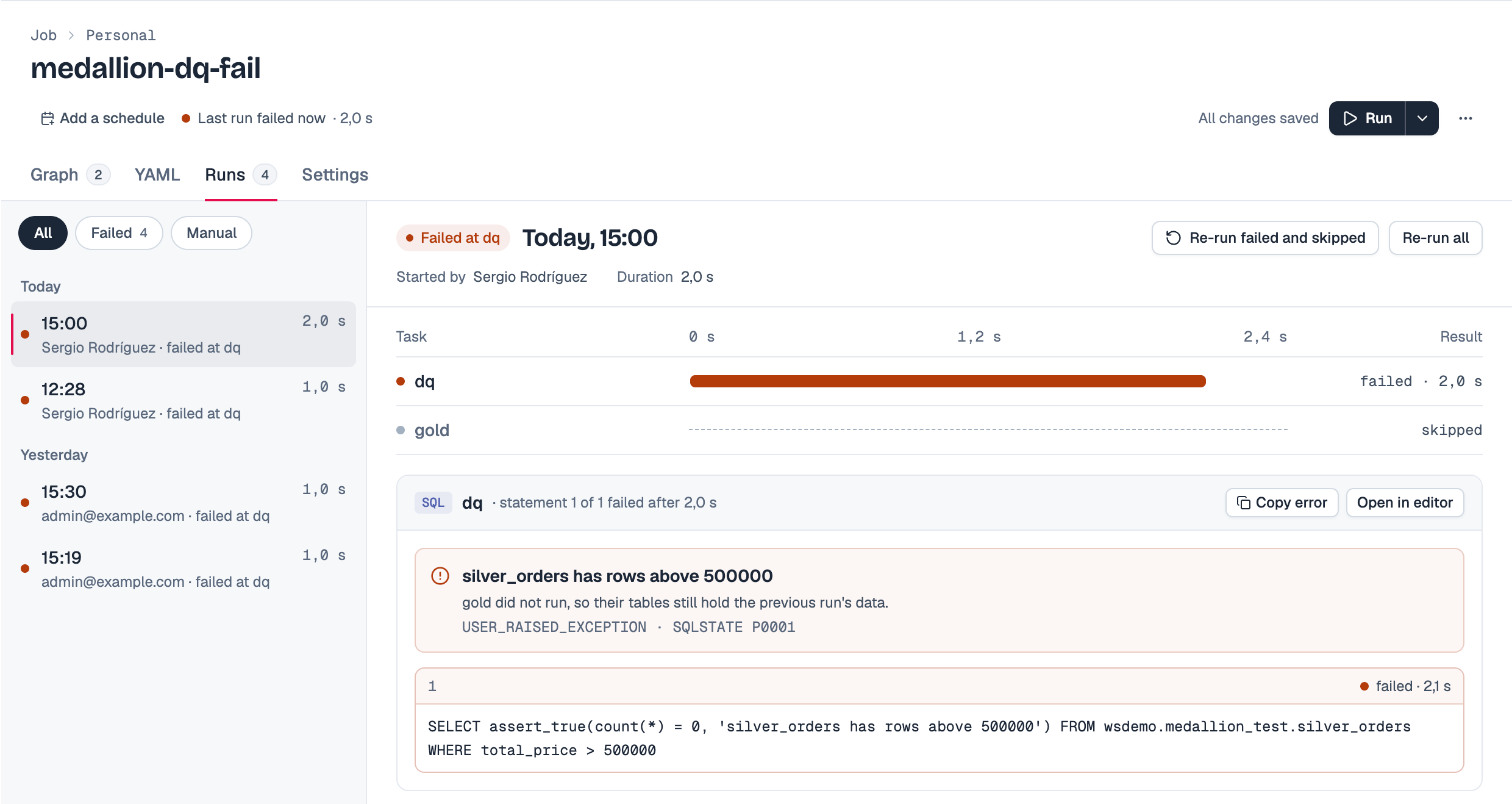
Re-run failed and skipped runs just those tasks once the data is fixed.
On engines without assert_true, divide by zero or cast an impossible string inside a CASE that fires only on bad data — anything that raises.
5. Gold
Gold reads silver only, and depends on the gate, so it is never built from data that failed it.
    - name: gold-revenue-by-nation-month
      type: sql
      datasource: databricks-prod
      depends_on: [dq-silver]
      statements:
        - |
          CREATE OR REPLACE TABLE lakehouse.gold.revenue_by_nation_month AS
          SELECT n.n_name AS nation,
                 date_trunc('MONTH', l.ship_date) AS month,
                 count(DISTINCT l.order_key) AS orders,
                 sum(l.net_revenue) AS net_revenue,
                 avg(CAST(l.returned AS INT)) AS return_rate
          FROM lakehouse.silver.lineitem l
          JOIN lakehouse.silver.orders o ON o.order_key = l.order_key
          JOIN samples.tpch.customer c ON c.c_custkey = o.customer_key
          JOIN samples.tpch.nation n ON n.n_nationkey = c.c_nationkey
          GROUP BY ALL
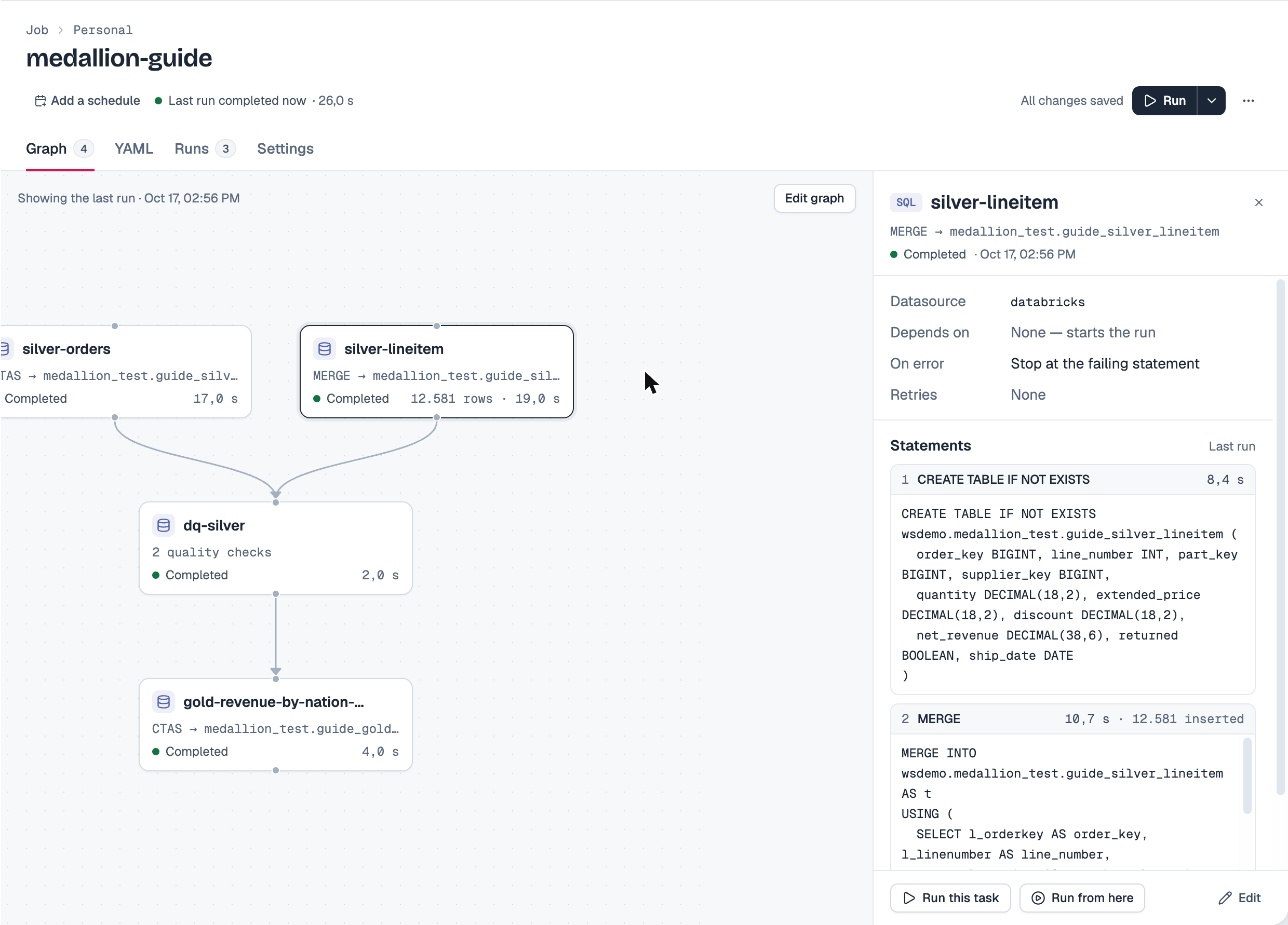
A run of the whole job, one day loaded, took 10 s on a 2X-Small warehouse. Each task in the graph says what it does and how it last went; select one and the inspector shows each statement with its result — time and rows inserted or updated:
6. Schedule it
Add a trigger — in the YAML, or in the Settings tab:
  triggers:
    - type: schedule
      cron: "0 3 * * *"       # every day at 03:00
      timezone: Europe/Madrid
Then turn the schedule on with the switch in the job's header, which reads it back in words — Every day at 03:00 · Europe/Madrid — and shows the next run. Off, the job keeps its schedule and runs only on demand.
run_date is the UTC date, whatever the trigger's time zone: 03:00 in Madrid is 01:00 or 02:00 UTC, the same day, but a run scheduled just after midnight local time gets the previous UTC date.
7. Run it, and back-fill
Run works whether or not the schedule is on:
-
If the job's statements read parameters, Run asks for them (and Run ▾ → Run with parameters… always does). A field left empty is not sent, so the job's default — or the statement's own
| default(run_date)— applies.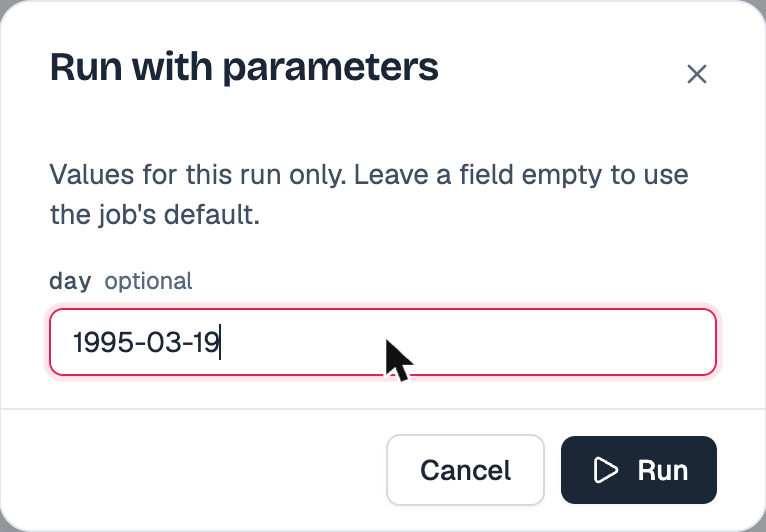
-
A job with no parameters starts at once.
-
Run a single task, or a task and everything after it, from the task's ⋯ menu in the graph or the inspector's buttons.
-
From outside Qry — a script that back-fills a range, say — start the run through the API:
curl -X POST "$QRY/api/lakeflow/jobs/<job-id>/run" \
  -H "Authorization: Bearer $TOKEN" -H "Content-Type: application/json" \
  -d '{"parameters": {"day": "1995-03-15"}}'
or ask in a conversation: "Run the job medallion-tpch with day = 1995-03-15."
To back-fill a range, start one run per day; the MERGE makes each one safe to repeat.
Watch a run live in the graph, and find every past run in the Runs tab: grouped by day, each with who or what started it and the parameters it used.
8. Check the lineage
Open the gold table in Databricks' Catalog Explorer → Lineage: it shows gold built from the two silver tables and those from samples.tpch, because every statement ran in the engine as ordinary SQL. Measured: the lineage appeared within about five minutes of the run.
Who can run SQL tasks
A SQL task writes to your warehouse through Qry's own connection, and Qry does not decide from the SQL text what a statement writes — an engine and a parser can read the same text differently. So the review is a person:
- Only a Qry admin may own a job with SQL tasks, and the identity it runs as must be an admin too. A non-admin's run of such a job fails before any statement is sent.
- A job runs as its owner by default; only the owner or an admin may start it.
- A
service_accountidentity can only be chosen by an admin owner.
Write access in the warehouse is therefore whatever the datasource's credential has, not the person's own Unity Catalog grants. Give that service principal exactly the schemas the medallion writes. Running each task as the user's own identity, so that Unity Catalog's grants decide, is planned.
Tips
- One task per table keeps the DAG readable, lets independent tables load in parallel, and lets you re-run one table alone.
on_error: fail(the default) stops a task at the first failing statement.on_error: continueruns the rest and still reports the task as completed — keep it for clean-up statements whose failure does not matter.- Retries (
retry_count,retry_delay_seconds) are for transient errors — a warehouse that was starting. They are safe only because every task above is idempotent. - Branching: give a task a
condition(condition: "params.mode == 'full'") and it runs only when it holds, or add aconditiontask whosebrancheschoose which tasks run — for example a full rebuild or the incremental load. Conditions seetasks,paramsandrun_date. - Timeouts:
timeout_secondsis per task (default 1 h, up to 24 h) andmax_duration_minutesper run. - Version it: put the job in a Git folder and it is saved as YAML with the SQL as readable blocks, so a review shows the SQL diff.
Related
- Qry Lakeflow — the feature reference.