Reviewing skill changes
A skill is guidance Qry reads when it answers — a definition, a rule, a procedure. When a shared skill changes, every answer in its scope changes with it. Qry lets you decide who may change one directly and who has to propose the change.
Proposals
Anyone who can read a skill can propose a change to it: its name, description, text, when it is read (in every answer, or when a question needs it) and whether it is on. A workspace member can also propose a new skill for that workspace.
The people who manage the skill decide: administrators for installation-wide and datasource skills, a workspace's owners (and administrators) for that workspace's skills. They are notified, and find the proposal:
- in the skill's Proposals tab in the Skills editor, with the text as it is now beside the proposed text;
- in the Proposed changes panel of the Skills editor's explorer, which lists every proposal they can decide on.
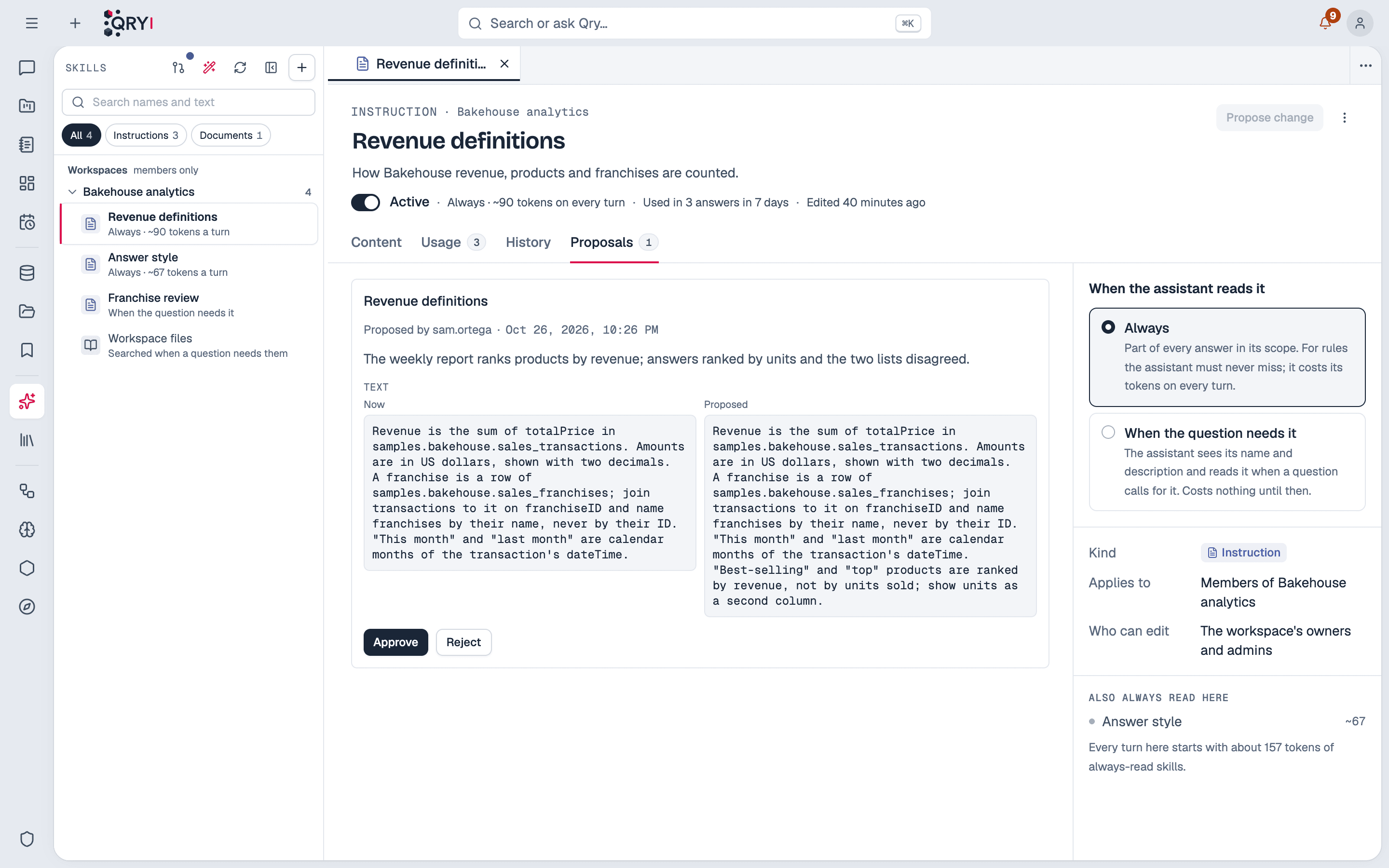
Approving applies the change as the skill's next version, written by the person who proposed it — the skill's history and the change record say who proposed it and who approved it. Rejecting keeps the proposal, with the decision's note, in the record. Either way, the person who proposed it is notified, with that note. The person who proposed can withdraw it while it is pending.
A proposal made against an older version of the skill than today's is refused on approval: applying it would undo the change made in between. Propose it again from the current text.
Notices for the three approval flows — skill changes, assistant memory, column descriptions — are one category, Approvals, in each person's notification preferences, so they can also arrive by Telegram or e-mail.
Turning review on
By default, whoever manages a skill saves it directly, and everyone else proposes. To make every change to a shared skill go through review — administrators' too — turn on:
Admin › System configuration › AI & Models › Skill review › Review every skill change
With review on:
- Saving a change to an installation, datasource or workspace skill is refused; the editor's Save becomes Propose change.
- Nobody approves their own proposal. Someone else who manages the skill has to.
- A shared skill created directly starts off; switching it on is a proposal.
- Moving a skill from one scope to another is refused, so a personal skill cannot become a workspace's without review.
- Personal skills are never reviewed: they reach only their owner's answers.
Admin › Governance shows whether review is required and since when.
Save a conversation as a skill
Often the best definition of a rule is a conversation where someone corrected the assistant until the answer was right. From the conversation's ⋯ menu, choose Save as skill: the assistant drafts an instruction skill from what the conversation established — including the queries that ran — and you edit it before anything is saved.
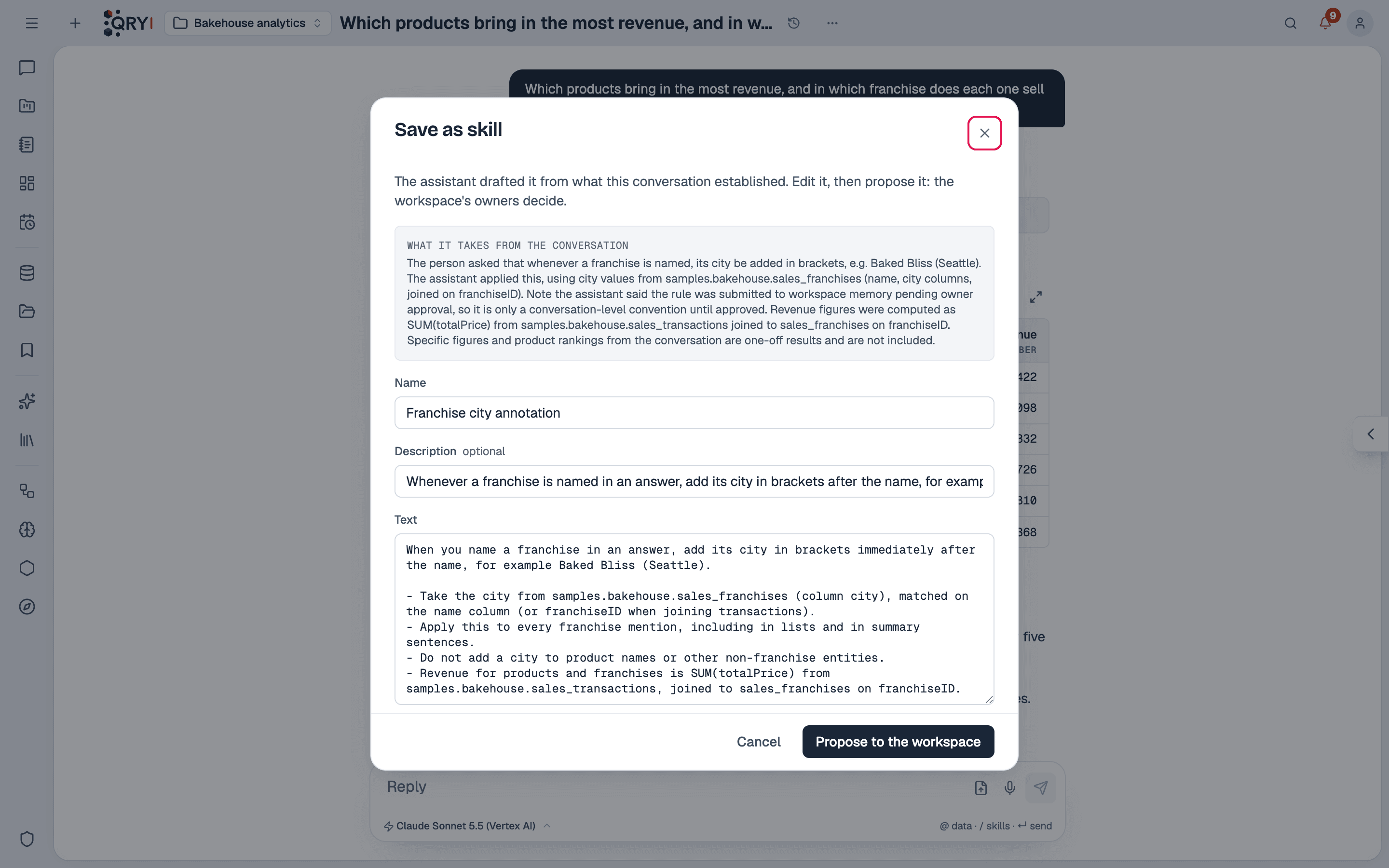
- In a workspace conversation, the draft is proposed to the workspace's owners.
- In a personal conversation, it becomes one of your personal skills.
Queries on datasources you cannot open are left out of what the assistant reads to draft it.
What review does not cover
Review covers a skill's name, description, text, when it is read and whether it is on. These are saved directly by whoever may edit the skill, and recorded with who did it:
- a skill's bindings to a datasource, catalog and schema;
- other settings, such as how a knowledge skill's documents are retrieved;
- a knowledge skill's documents;
- a procedure's steps and a skill's scripts;
- deleting a skill;
- a workspace's instructions edited from the workspace's settings.
Admin › Governance shows this same list, so nobody has to remember it.