Business domains
People think of their data by what it is about — Hotel bookings, Payroll, Stock in stores — not by where it lives (ventas_dw.reservas). A domain gives a data area that name, says what it answers and who looks after it, and gathers the tables that belong to it, whichever schemas they are in.
A conversation can then ask in a domain. Qry gives the model only the domain's tables and a note naming the domain, so answers are faster and more precise than asking over a whole catalog.
What a domain holds
| Field | What it is |
|---|---|
| Name | The business name people use: Hotel bookings. |
| What it holds | A description of what the domain answers. Qry tells the model this whenever someone asks in the domain, so write it for that: which questions it covers, what its main figures mean. |
| Steward | The person who looks after the domain's data. Optional. |
| Tables | Tables of one data source and one catalog, from any of that catalog's schemas. |
The list
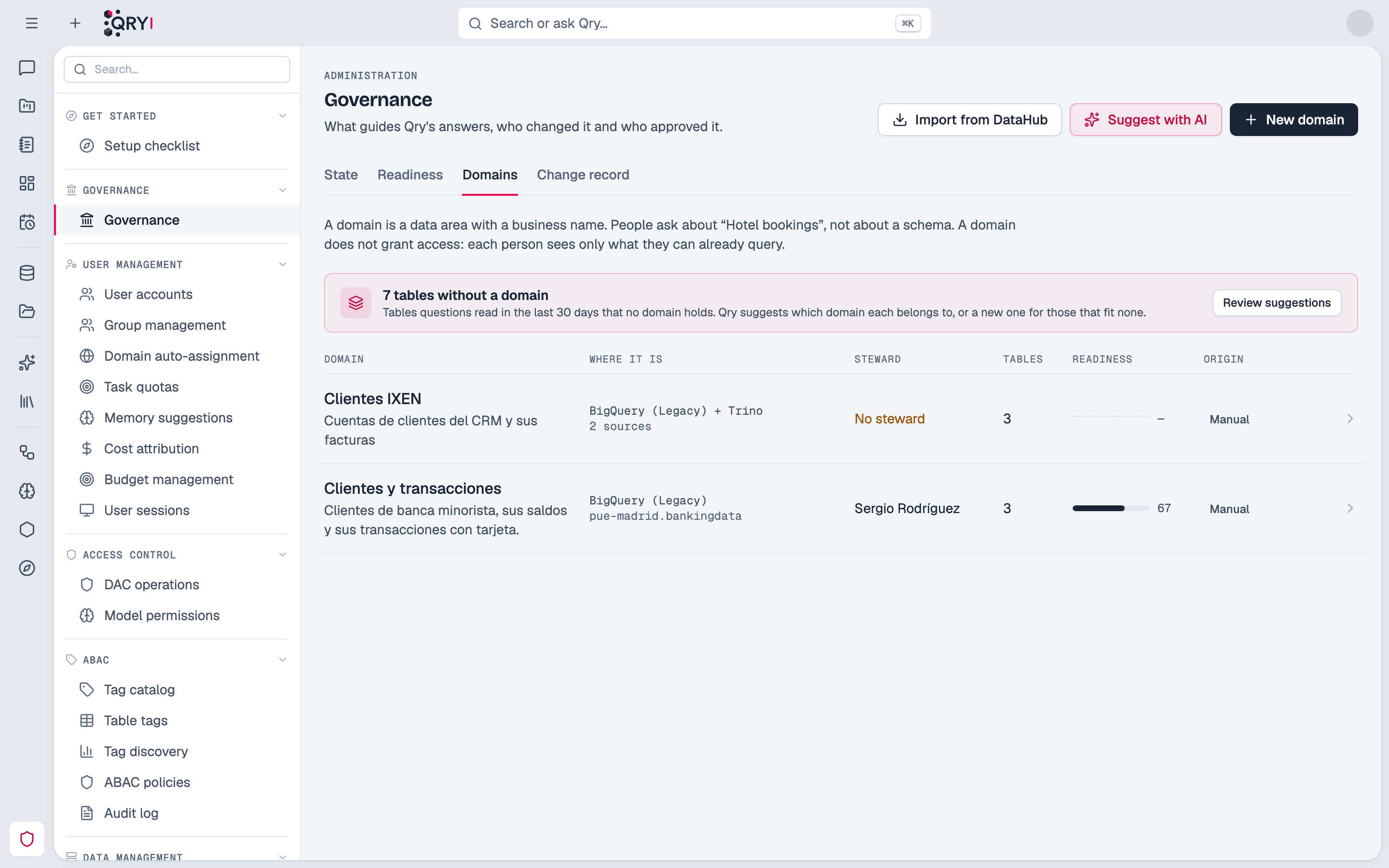
Admin › Governance › Domains (administrators) lists every domain:
| Column | What it shows |
|---|---|
| Domain | Its name and what it holds. |
| Where it is | Its data source and catalog. |
| Steward | The person, or No steward. |
| Tables | How many tables it gathers. |
| Readiness | The readiness of its schemas, weighted by how many of its tables are in each. |
| Origin | Where the domain came from: Manual, DataHub when it was imported, or Suggested by AI when it was created from Qry's proposal. |
Creating and editing a domain
Only administrators create, edit and delete domains.
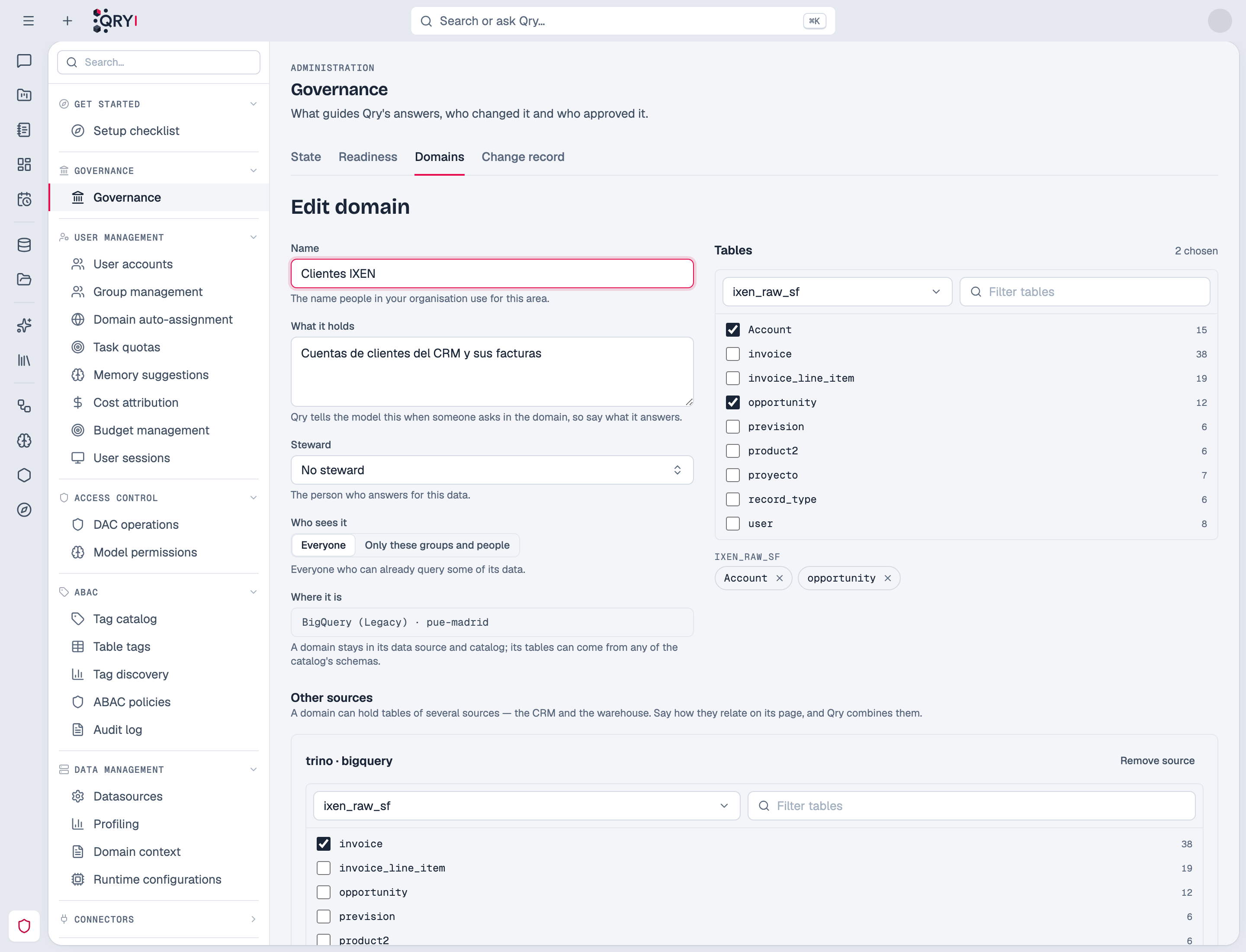
- In Admin › Governance › Domains, click New domain.
- Give it a name, what it holds and, if there is one, a steward.
- Choose its data source and catalog. They are fixed once the domain is created: for another catalog, create another domain.
- Add tables schema by schema, from the tables Qry already knows.
- Save.
A domain's page shows its tables, readiness and steward, with Edit and Ask about this, which opens a new conversation asking in the domain.
Tables are listed from Qry's own index of each datasource's tables, never by querying the engine — choosing tables never starts a stopped Databricks warehouse. A table that was renamed or dropped in the source stays in the domain marked Qry no longer finds it, until someone removes it or the source has it again.
Domains Qry suggests
Above the list, N tables without a domain counts the tables people's questions read in the last 30 days that no domain holds yet. Review suggestions (or Suggest with AI) shows Qry's proposals one by one.
Qry groups tables by how people use them: tables read together in the same answers are one business area. A group that is mostly read alongside an existing domain is proposed as an addition to it. For each proposal you see:
- a name and what it holds, written by Qry's model — edit them freely;
- its tables, each with how many answers read it. Tables whose columns look like personal data are marked Doubtful and start unticked;
- Why Qry proposes it: how many answers read these tables together, what their columns talk about, and which workspaces use that schema by default;
- Questions it would answer.
Nothing is created until you accept a proposal (Create domain or Add to the domain). Discard skips it. The model only writes the words; which tables go together and the counts come from the answers themselves.
The Catalog by domain
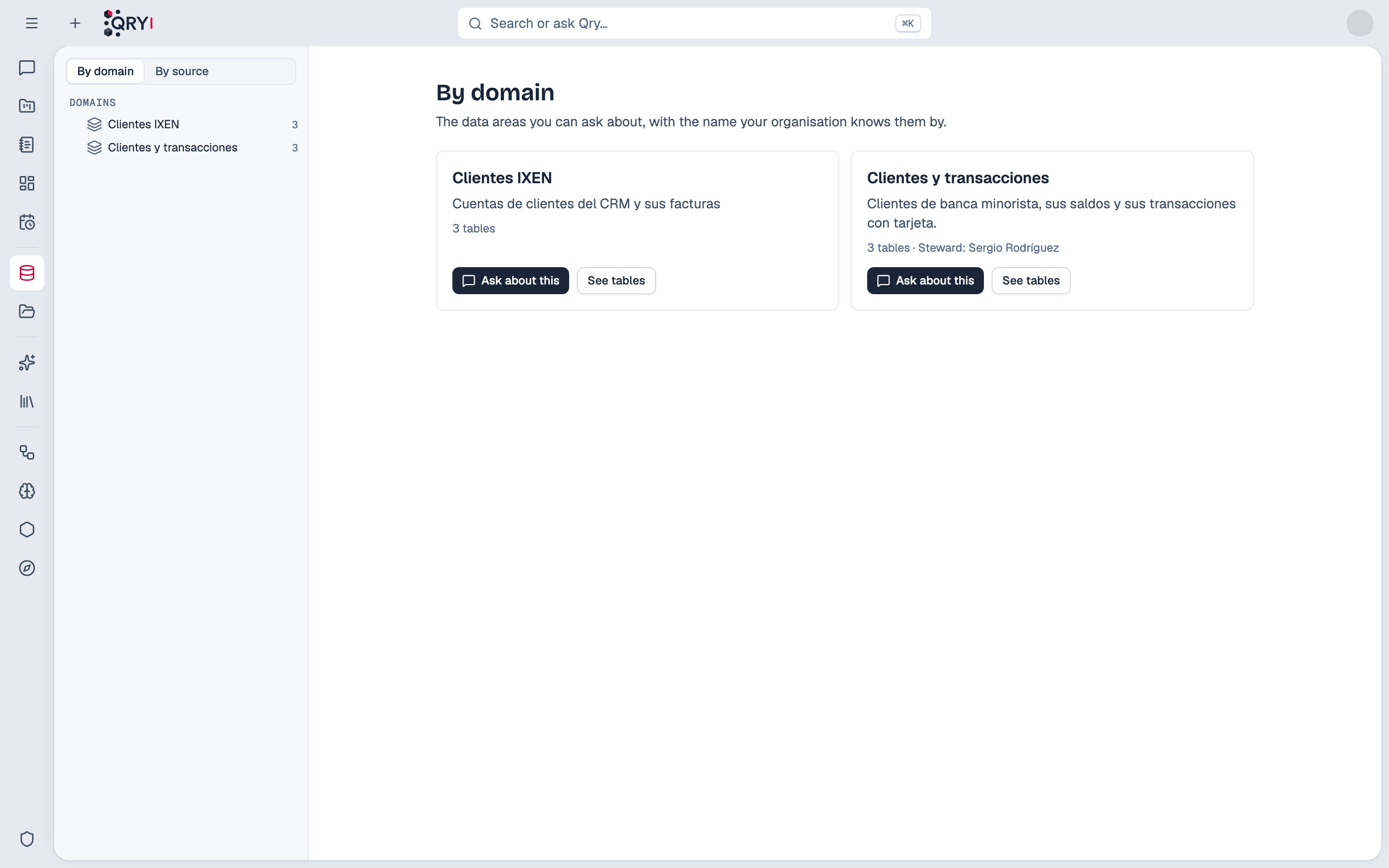
People who can ask in at least one domain see By domain first in the Catalog: a card per domain with what it holds, its steward, Ask about this (a new chat in the domain) and See tables, which lists the domain's tables that person may see. By source goes back to data sources, catalogs and schemas.
Importing domains from DataHub
When DataHub is connected (see DataHub), Import from DataHub lists the domains DataHub already has. For each one Qry shows what it would do:
- New domain: Qry creates it with DataHub's name, description and owner as steward.
- Joins the existing one: a domain you made by hand with the same name and place is linked to DataHub. It keeps your name and description.
- Already imported · it is updated: it was imported before and takes DataHub's changes.
- Qry knows none of its tables: none of its tables is in a data source Qry reads, so there is nothing to import.
A DataHub table becomes part of a domain only when Qry already knows that table: Qry matches DataHub's datasets against its own index, never by guessing. A domain still lives in one data source and catalog, so it takes the one holding most of its tables; the dialog says how many tables are left out and why.
They stay in step. Every night, domains linked to DataHub take its changes: tables added or removed in DataHub, and the name and description of the domains DataHub created. Two things are never touched: tables you added by hand in Qry, and DataHub tables you removed in Qry — removing one is remembered, so it does not come back. Add it again by hand to undo that. Each nightly change appears in the change record as made by DataHub.
Publishing a domain to DataHub
A domain made in Qry — by hand or from a suggestion — can be published so every tool that reads DataHub sees it: Publish to DataHub on its page creates the domain in DataHub with its name and what it holds, and assigns it to its tables. Only tables DataHub already has, and that no other DataHub domain holds, get it; the dialog says how many are left out and why. A table another DataHub domain holds is never moved.
Who owns a domain decides which way changes go. A domain imported from DataHub belongs to DataHub: the nightly sync brings its changes here. A domain published from Qry belongs to Qry: each change you make here — tables added or removed, name, what it holds — is published to DataHub, and only that change. Qry never undoes on its own what someone changes in DataHub itself: the domain's page shows where DataHub and Qry differ (tables only in one of them, a different name), and Make DataHub match Qry replaces DataHub's version only when an administrator chooses it. If DataHub cannot take a change, Qry keeps it, says so, and tries that same change again every night. Deleting a published domain in Qry leaves it in DataHub; delete it there if it is no longer needed. Tell the people who look after your DataHub which domains are edited in Qry.
A domain with several sources
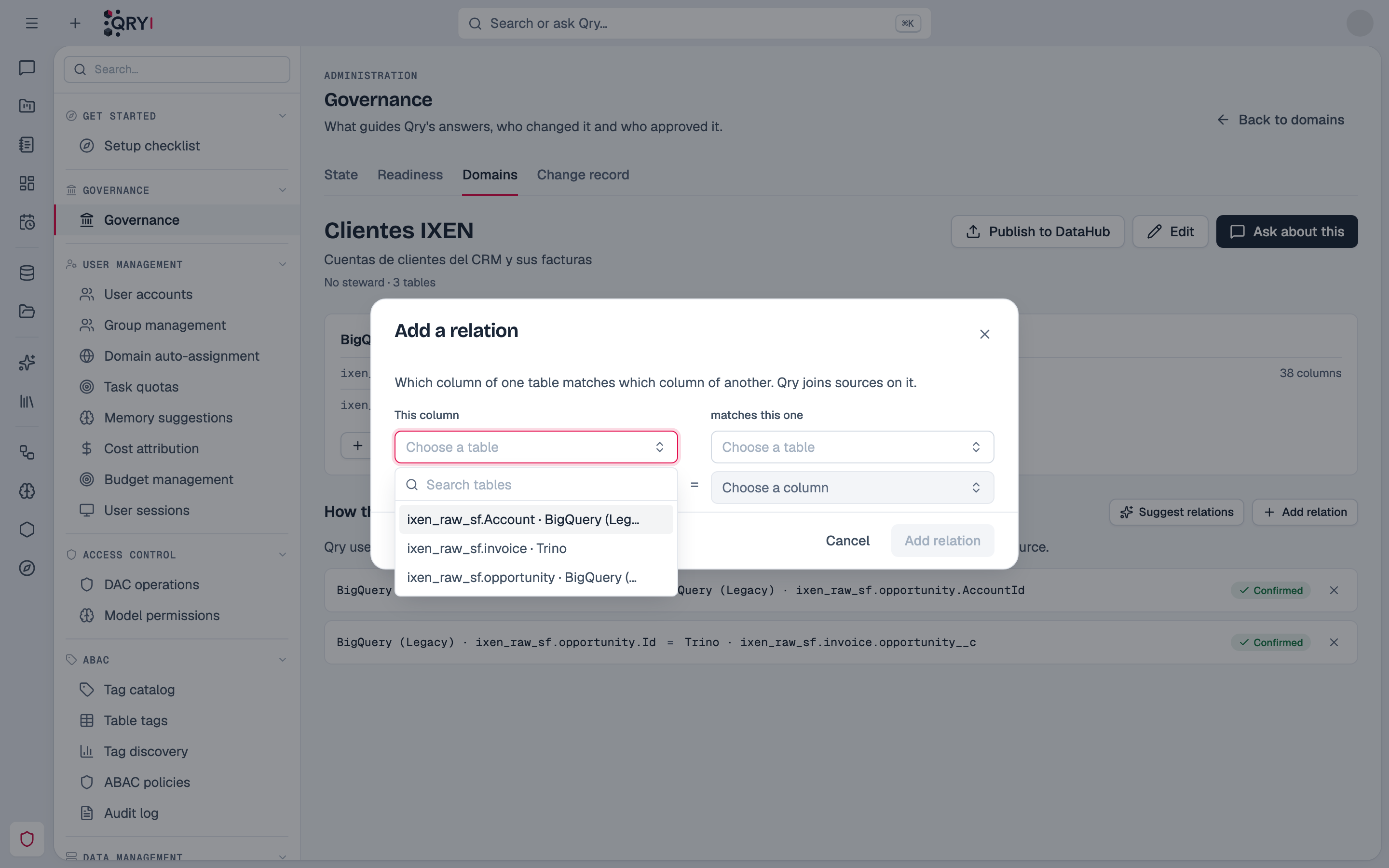
A business area often lives in more than one system — the CRM and the warehouse. A domain can hold tables of several data sources: in the editor, Add another source and choose its tables. Its page shows a card per source and How they relate: which column of one table matches which column of another (Account.Id = clientes.sf_account_id).
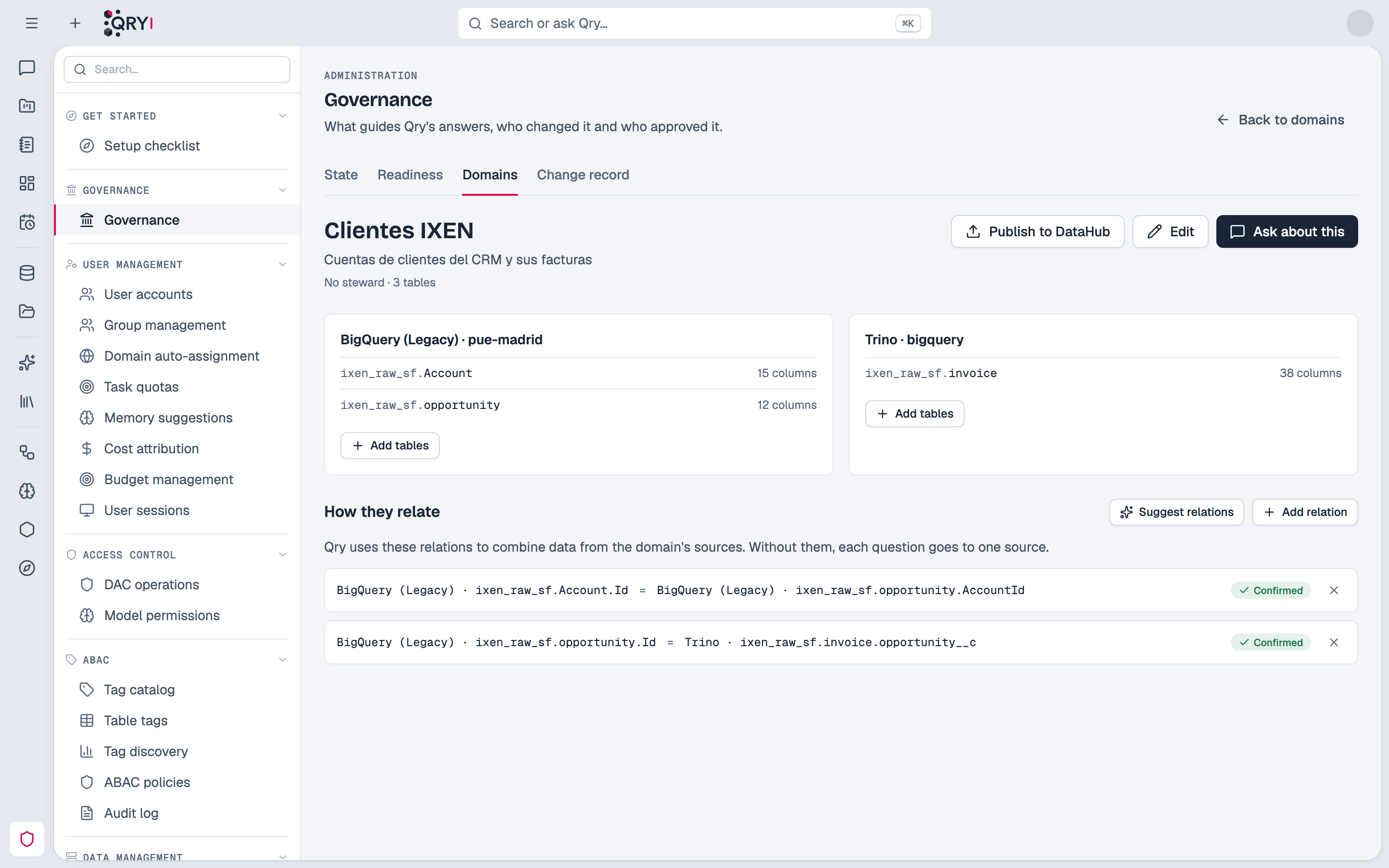
- Suggest relations proposes them from the column names —
cliente_idandclientes.id,AccountIdandAccount.Id, Salesforce'sopportunity__candopportunity.Id. Confirm the right ones and discard the rest; Add relation says one by hand, searching tables and columns as you type — each table says which source it is in.
- In the chat, Qry gives the model each source's tables and the confirmed relations. A query reaches one source, so Qry queries each one for what the question needs and combines the results. Without relations, each question goes to one source.
- A Trino that already federates several catalogs counts as one source: a domain over it needs no relations.
A domain never grants access
A domain is a name and a set of tables, not a permission. Who may read which table is still decided by grants, row filters and, on Databricks, the person's own identity:
- Each person sees only the domains where they can reach at least one schema.
- When someone asks in a domain, Qry gives the model only the domain's tables that person may query. Two people asking in the same domain can get different tables.
Who sees a domain
Sometimes the name of a domain says too much on its own: "Payroll and sick leave" tells everyone the area exists. In the editor, Who sees it narrows the domain to some people and groups:
- Everyone (the default): everyone who can query some of its data.
- Only these groups and people: only them. Of them, still only those who can query its data — an audience narrows, it never widens.
Everyone else does not see the domain anywhere: not in the list, the chat, search or the Catalog. Administrators see every domain. A domain with an audience shows a lock in the list, and each change of audience is recorded with the domain.
Asking in a domain
In the chat, the chip that shows where a conversation asks offers Domain first whenever the person may ask in any domain. Choosing one, the chip shows the domain's name. Reopening a conversation goes back to the domain its last answer used.
When a conversation does not ask in a domain — a specific schema, or everything the person can query — Qry still tells the model which domains the person has. If a question is about one of them, the model looks the domain up first, with its tables and how they join, instead of exploring catalogs on its own. This changes nothing about where the conversation asks or what the person can read.
Recorded
Every domain created, changed or deleted is in the change record under Domains: who did it, when, what changed, and the tables added and removed.
Domains replace presets
Earlier versions let each person save datasource, catalog and schema combinations as presets. Presets are gone: a domain does the same job once, for everyone who may use it, with a name people recognise.
Domain Context is about documents — glossaries and business rules uploaded as knowledge skills. A business domain is about tables: where a question asks.