Readiness for AI
An assistant answers well about data it understands: tables and columns that say what they hold, codes whose values someone explained, definitions written down once. Readiness measures that for every schema, and lists what is missing, starting with what would improve the most answers.
- Admin › Governance › Readiness — every schema, the most asked first (administrators).
- Catalog › a schema › Readiness — one schema in detail, for anyone who can open it.
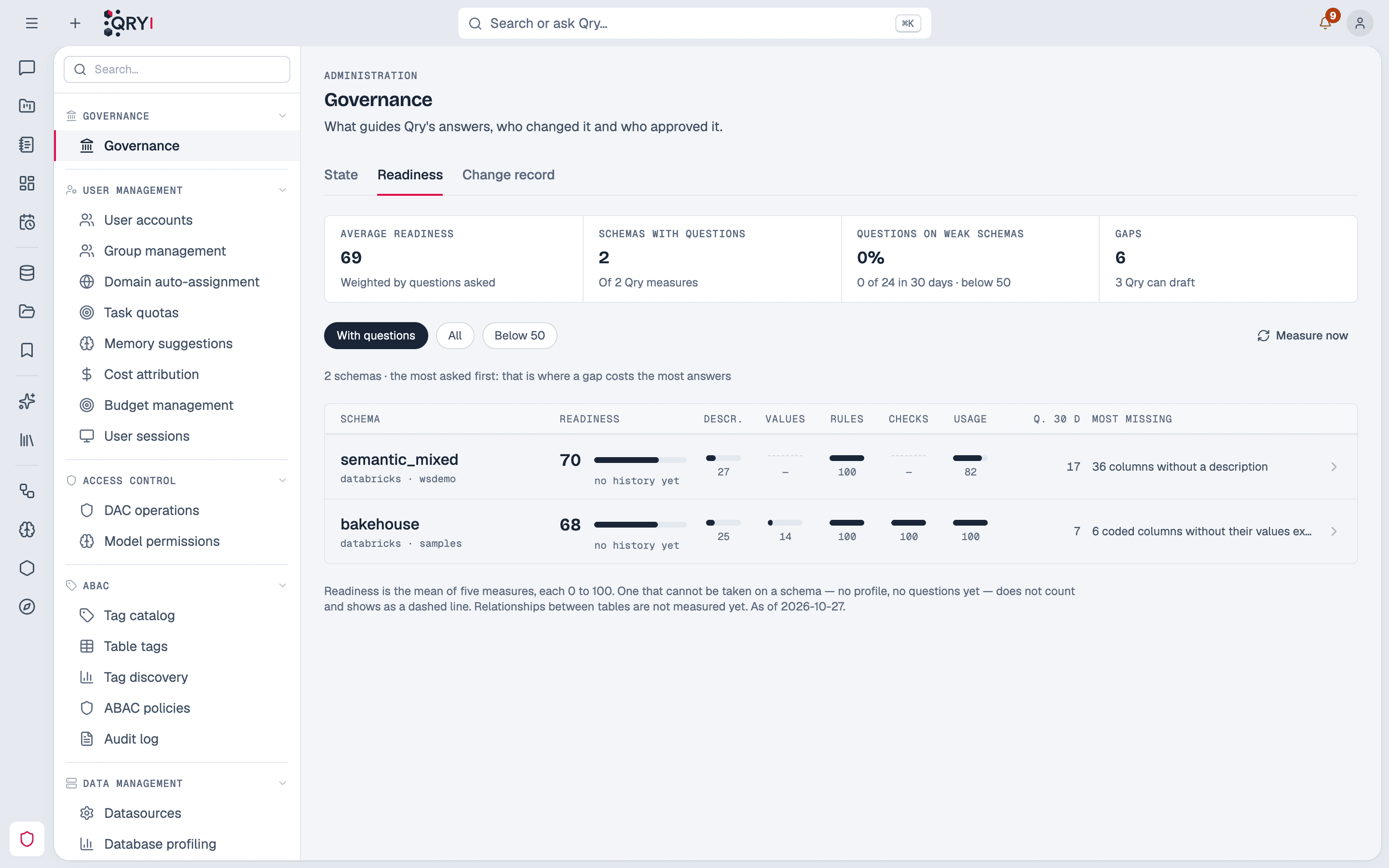
The five measures
Each measure goes from 0 to 100 and comes from something Qry already keeps — nothing to set up.
| Measure | What it looks at |
|---|---|
| Descriptions | Tables and columns that say what they are: the engine's own column comments, or DataHub's descriptions. |
| Values explained | Coded columns — few, short values such as S, M, L or amex, visa — whose values a description or a skill explains. Found in the table profiles. |
| Rules | Skills and metric views that reach the schema, without open warnings from Skill Health. |
| Checks | Answer checks asked there that held in their last run. |
| Usage | Answers given there in the last 30 days without a failed query or a 👎. People's questions only, not answer-check runs. |
The score is the mean of the measures that can be taken. One that cannot — a schema not profiled yet has no values to explain, one nobody asked about has no usage — does not count, and shows as a dashed line instead of a zero. Relationships between tables are not measured.
A code is a column with at most 20 distinct values of at most 12 characters, none of them shaped like personal data. Names, e-mail addresses, phone numbers, identity or account numbers are never treated as codes, by their values or by the column's name: listing them in a description would put personal data where more people read it than can read the table.
One schema
Catalog › a schema › Readiness shows the score, each measure with what it counted, and what is missing, in order — the gap that would add most points first. Each gap says how many points fixing it adds, where that can be known.
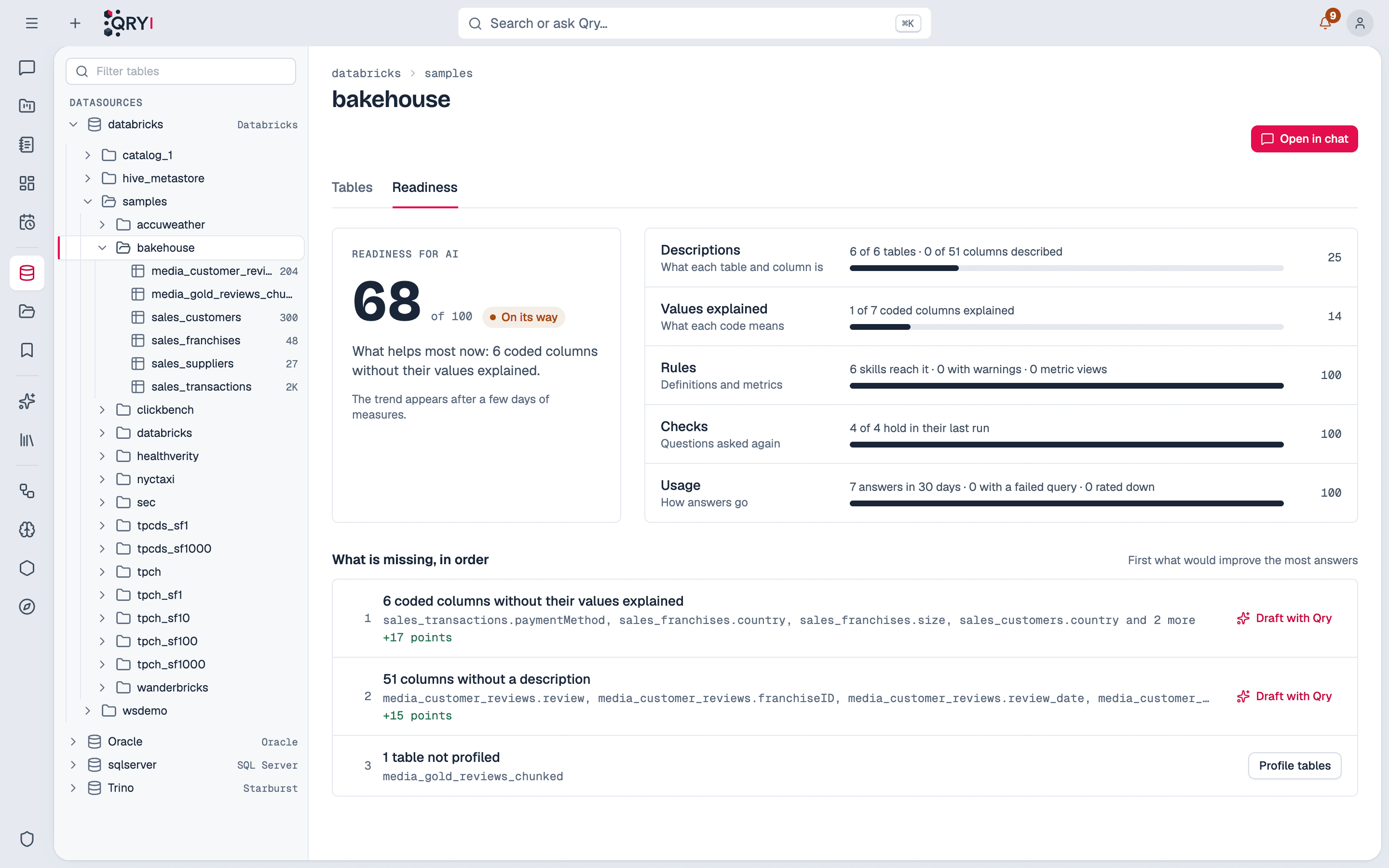
A person who is not an administrator sees only the tables they may browse and the skills of their own workspaces. The score is theirs: what Qry can answer for them.
The score is measured every day, so the page shows its trend after a few days: the before and after of the work done on a schema.
Qry drafts what is missing
Two gaps Qry can fill itself: columns without a description and codes whose values nothing explains. Draft with Qry opens a draft with one text per column.
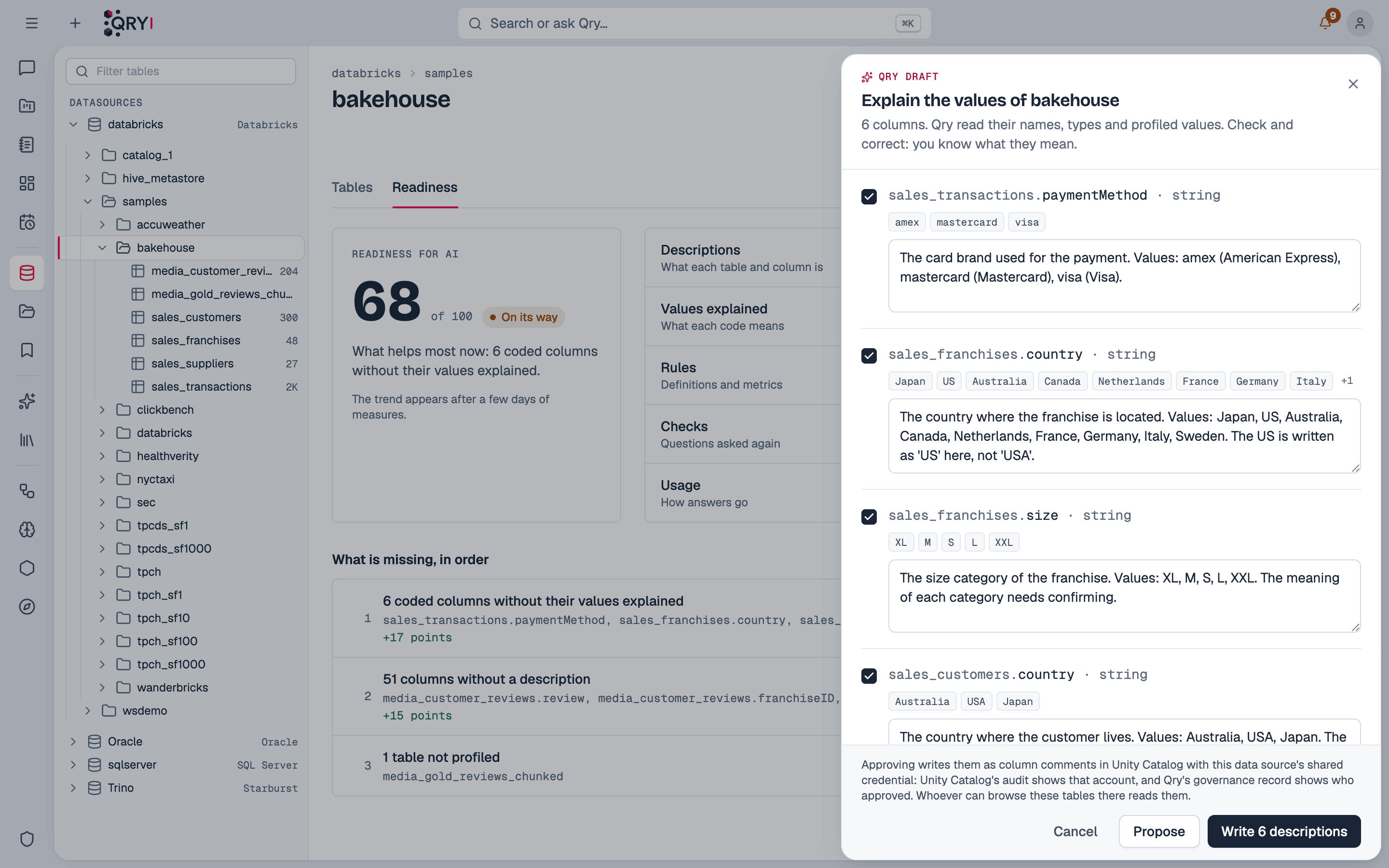
What the model reads, and what it is told:
- each column's name and type, its table and the table's other columns, and its current description if it has one;
- the values, only for true codes, and never for a column an attribute-based access tag marks;
- to name every value as written and explain it only when the column, its table or a common standard makes the meaning clear (card brands, country names, Y/N flags) — and otherwise to say its meaning needs confirming. It never invents a business meaning, a unit or a source.
The draft is a starting point. The person who knows the data checks it, corrects it, unticks what is wrong, and proposes it.
Approving and writing
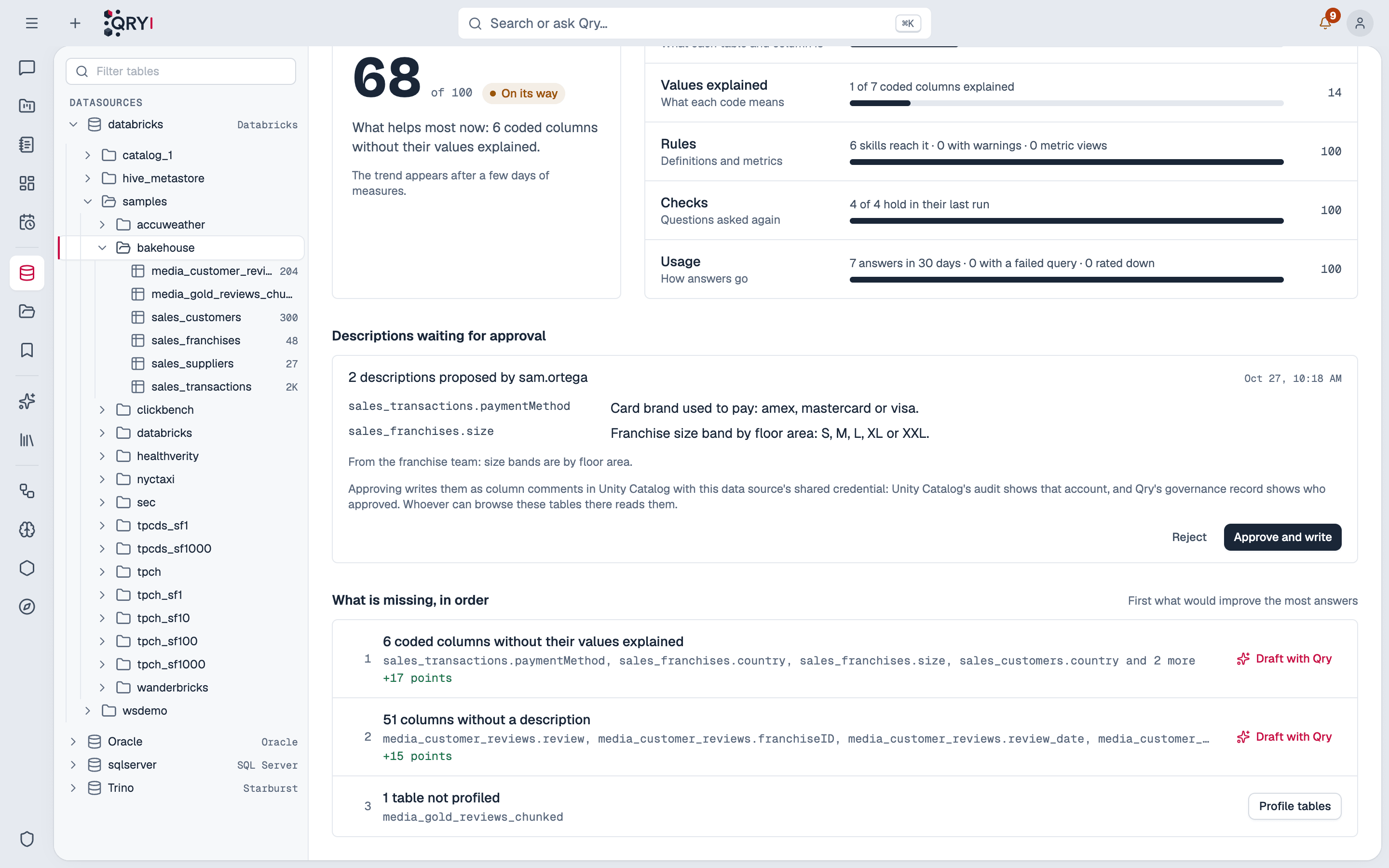
A proposal waits in the schema's Readiness tab and in Admin › Governance › Waiting for a decision, and everyone who may approve it is notified; whoever proposed it is told when it is decided. When an approval ends as statements, the datasource's administrators are notified that they wait to be run. A description belongs where the data's own metadata lives — the engine or the organisation's catalog — so every tool reads it, not only Qry. Approving puts it there with the approver's permissions:
| The table is in | Approving | Who may approve |
|---|---|---|
| Databricks | Writes column comments in Unity Catalog | Administrators, and people with a write grant on the datasource |
| BigQuery | Writes the columns' descriptions in BigQuery (tables and views) | Administrators, and people with a write grant on the datasource |
| Trino / Starburst | Writes column comments through Trino, kept by each catalog's metastore (Hive, Iceberg…) | Administrators, and people with a write grant on the datasource |
| SQL Server | Writes the columns' descriptions (MS_Description), adding or updating them | Administrators, and people with a write grant on the datasource |
| DataHub (a table it knows) | Writes the columns' descriptions in DataHub | Administrators, and the datasource's administrators |
| Any other database | Writes nothing: gives the statements (COMMENT ON COLUMN …, or the engine's equivalent) for whoever administers the database to run | Administrators, and people with a write grant on the datasource |
Outside Databricks, BigQuery, Trino and SQL Server — and on those too, when Qry's account is read-only — the credential Qry holds on a production database rarely may change its metadata, and should not have to. The approved statements wait under Approved, waiting to be applied, ready to copy, until Qry reads the descriptions in the database; then they leave the list and readiness counts them. A schema whose tables are partly in DataHub gets one proposal for each destination. To know which tables DataHub has, Qry asks it about all of them at once; if DataHub does not answer, nothing is proposed — the draft stays open — rather than sending those tables' descriptions to the wrong place. Propose again in a moment. If DataHub answers but refuses Qry's credentials (an expired or revoked token), waiting would not help: those tables go to the statements — the database comment DataHub reads from anyway — and the panel says so, until an administrator renews Qry's DataHub token.
- All or nothing. If one description cannot be written — a column was dropped, the engine errors — those already written are put back and the proposal stays pending, with the engine's reason.
- A read-only account is not an error. Many installations connect Qry with an account that may read but not change metadata. When Databricks, BigQuery, Trino (Ranger included) or SQL Server refuses Qry's account for that reason, approving goes on as the statements for whoever administers the database, exactly as for any other engine, and says so. Once the account is allowed to write, approving writes directly.
- Writing at once to two places. When someone who may approve writes a draft straight away and it goes to two destinations, each is written on its own: the message says which was written and which stayed as a proposal, and why.
- Review applies here too. With skill review on, nobody approves their own proposal. With it off, someone who may approve can write a draft at once.
- Recorded. Each proposal and decision is in the change record under Descriptions, with the text before and after.
Whose name the engine records
Qry always records who proposed and who approved. What Unity Catalog's own audit records depends on how the datasource connects:
- Each person with their own identity (queries as the user) — the comment is written with the approver's Databricks account, and Unity Catalog's audit names them.
- A shared credential — Qry checks the approver's permissions, but the comment is written with the datasource's credential, and Unity Catalog's audit names that account. Only Qry's record names the approver.
BigQuery descriptions are written with the datasource's service account, so BigQuery's audit log names that account. DataHub descriptions are written with Qry's DataHub credential. The panel says which case applies before you approve.
Limits
- Readiness measures what Qry can see. A description can be present and wrong; a skill can reach a schema and be outdated. The answer checks are what tell whether answers hold.
- Values come from the profile. Profiling reads a sample of each table with the datasource's own credential, not with each person's row filters — which is why columns with an access tag, and every column of a table with one, never show their values.
- Qry reads column comments from Databricks, BigQuery, Snowflake, PostgreSQL, Oracle, SQL Server, Starburst/Trino and Cloudera (Impala/Hive) — on Cloudera and SQL Server, each table's own description too. A source without column comments — Salesforce, a Kafka topic — cannot take drafted descriptions.
- Relationships between tables are not measured yet.