Exporting to dbt
Some customers keep QRY after a migration. Others want the result as something their own team owns and runs — and for analytics engineering that is usually a dbt project. Forge exports one: the tables it copied become sources, the views it translated and verified become models, and the routines they call are created before the models build. Nothing is translated again, and nothing the export builds touches what Forge deployed.
Goal
You finish this page with a dbt project that runs green against the target dataset and that your team can commit to their own repository.
Prerequisites
- A project whose view translations have run and validated — the export only takes views that are Migrated or Validated; a view still in Needs review or Failed is left out and the README says why.
- On the machine that will run it:
dbt-bigquery(pip install dbt-bigquery) and credentials for the target project (gcloud auth login, or a service account the profile points at).
What the export contains
| Forge artifact | In the dbt project | Why |
|---|---|---|
| Tables Forge copied | sources in models/sources.yml, each column with the unique / not_null tests that the source catalog's primary keys and NOT NULLs justify | A copied table is data dbt reads; it is not dbt's to build |
| Verified view translations | models/*.sql, materialised as views, with ref() for other models and source() for tables | Decided by what the referenced object is in the migration — never by its name |
| UDFs and table functions | Created by an on-run-start hook before any model builds, addressed as {{ target.schema }}.fn | dbt has no function objects; the hook makes them exist where the models look |
| Procedures | Copied under forge_reference/ | A load procedure is not a model. Turning one into an incremental model changes when and how data moves, and needs its own parity check — a separate step, not done by the export |
Models build into a sibling dataset (<target>_dbt) in the target dataset's own region, so dbt run never rewrites the objects Forge deployed and a profile in the wrong region cannot silently see nothing.
Steps
1. Preview
Project Overview → Deliverables card → Preview. Each artifact is listed with its role (source / model / routine / reference / left out) and the reason. What you see there is what the README in the zip will say — the two cannot disagree, they come from the same classification.
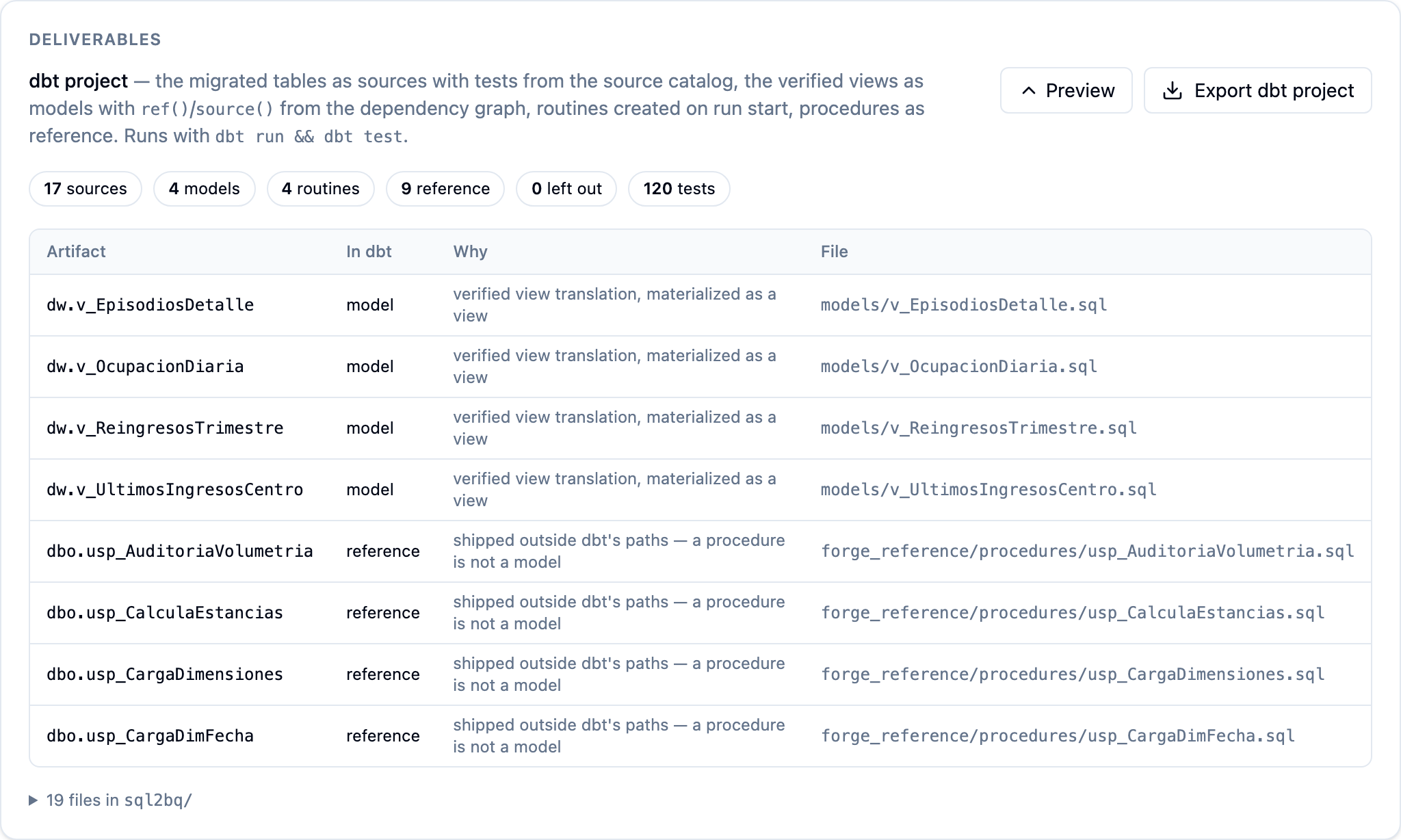
2. Export
Export dbt project downloads a zip:
<project_code>/
  dbt_project.yml
  profiles.yml.example      # project / dataset / region already filled in
  models/sources.yml        # copied tables + tests
  models/*.sql              # verified views
  macros/                   # the on-run-start hook that creates the routines
  forge_reference/          # procedures, for reading
  README.md                 # what each artifact became, and what was left out and why
3. Run it
cd <project_code>
cp profiles.yml.example profiles.yml       # or ~/.dbt/profiles.yml
dbt debug --profiles-dir .                 # connection test
dbt ls    --profiles-dir . --resource-type model
dbt run   --profiles-dir .                 # hook creates the routines, then builds the views
dbt test  --profiles-dir .                 # the source tests
dbt docs generate && dbt docs serve gives the lineage graph — models hanging off their sources, tests on each source. That page is the visual; QRY itself only shows the preview.
4. Check it says what Forge said
A model built by dbt is the same SQL Forge deployed and validated, so a quick comparison closes the loop:
dbt show --profiles-dir . --inline "select count(*) as n from {{ ref('v_EpisodiosDetalle') }}"
against the same count on the Forge-deployed view, or on the source. Measured on a hospital-warehouse estate: dbt run 5/5, dbt test 121/121, the four models equal to Forge's views and to the source.
5. Hand it over
Commit the folder to the team's repository. From here it is theirs: scheduling, environments, CI, and — if they want it — the procedures' logic rebuilt as incremental models, with a reconciliation of the written tables as the proof.
Common issues
A view I expected is under "Left out". It has not validated. The README gives the reason; fix the artifact in Forge (see Reviewing translations), re-run the wave, export again.
dbt run cannot find a function.
The hook creates the routines in {{ target.schema }} — the dataset your profile points at. If you edited the profile to another dataset, the routines went there too; the models reference them by target.schema, so keep the two consistent.
dbt test fails on a unique test that passed in Forge.
The test comes from a primary key in the source catalog. If the target copy carries duplicates, the Forge reconciliation for that table should already be red — look there first; the dbt test is a second witness, not a different claim.
The profile's region does not match.
The export reads the target dataset's location from the target itself and writes it into profiles.yml.example. If you moved the dataset, edit location:.
See also
- Approving and deploying — the validations the export relies on.
- Reviewing translations — getting a left-out view to Migrated.
- Forge reference — the deliverable in the feature overview.